
Schedule and days off
Set your opening hours for each day of the week, the start times on offer, notice and booking window, and days off.
Customers can only book inside your opening hours. Set them under Bookline → Settings → Schedule.
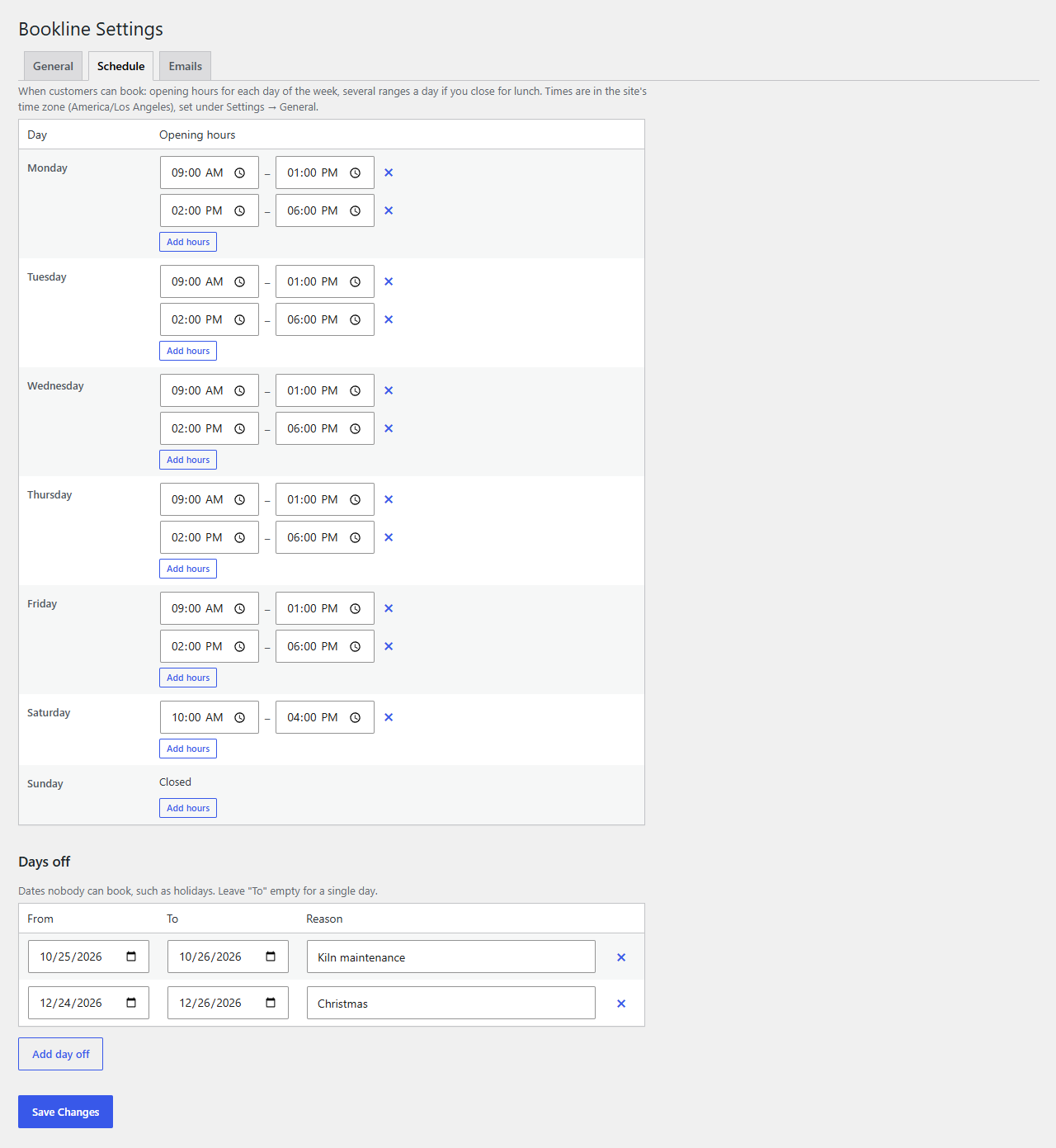
Opening hours
Each day of the week has its own hours. A day without hours is closed.
- Add hours adds a range to a day. Add a second range on days you close for lunch: for example 9:00–13:00 and 14:00–18:00.
- The × next to a range removes it.
- Overlapping ranges are joined when you save.
Times are in your site's time zone (Settings → General → Timezone).
Days off
Under Days off, add dates nobody can book: holidays, training days, a week away. Leave To empty for a single day. The Reason is for you, and shows on the calendar. Click Save Changes.
Bookings you already have on a new day off stay; move or cancel them yourself.
Start times, notice and the booking window
Under Bookline → Settings → General:
| Setting | What it does |
|---|---|
| Start times | How far apart the times on offer are. "One after another" (the default) offers each service back to back from each opening time; "Every 15 minutes" offers more choice. A booking always has to end inside the opening hours. |
| Minimum notice | How long before a time it can still be booked online, in hours. With 2, a visitor at 10:05 can book 12:30 but not 11:30. |
| Booking window | How many days ahead customers can book. |
You can always add a booking yourself at any time, also outside your hours (see Managing bookings and the calendar).
Bookings at the same time
Also under Bookline → Settings → General, Bookings at the same time says whether bookings for different services can overlap:
- One at a time (the default): any booking, with its buffer time, makes that time busy for every service. Right for one person or one room: nobody can book a consultation while a class is running.
- Services side by side: each service only counts its own bookings, so a class and a consultation can run at the same time (separate rooms, or a colleague taking one of them). A service still can't be booked twice at once, and a group service still fills up its places.
Either way, the check is made again on the server, in turn, as each booking is saved, so two customers can't take the same time by booking at the same moment.
With Bookline Pro staff members, the rule is per person: each staff member does one thing at a time, while two staff members can work at the same time. "Anyone available" books whoever is free.
Daylight saving
Bookline works with wall-clock times: 9:00 stays 9:00 on the day the clocks change, and a time that doesn't exist that night (the hour skipped in spring) isn't offered.