
Licenses and updates
Activate your license key for updates, move it to another site, and what happens when it expires.
Note
This is part of Bookline Pro.
Your license lets your site download Bookline Pro updates. The features keep working without it.
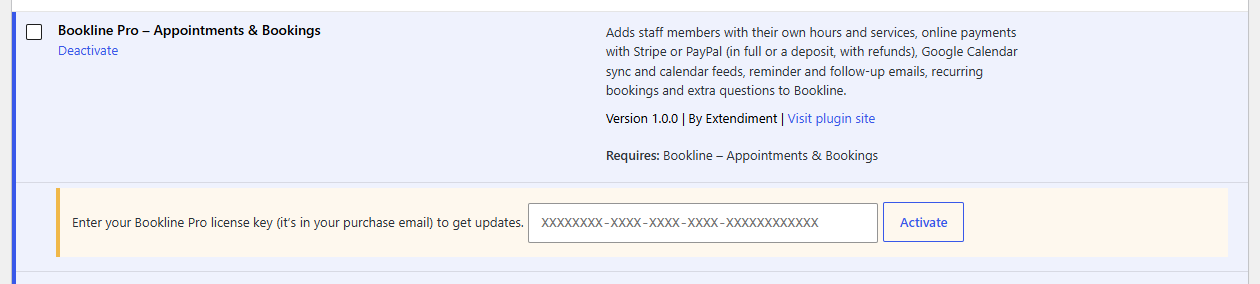
Activate
- Go to Plugins. Under Bookline Pro there's a box asking for your key.
- Paste the key from your purchase email and click Activate (or press Enter).
The box turns green and shows the key's last characters and when updates run until. Updates then appear on Dashboard → Updates like any other plugin's.
An All Access key works too: it covers every Extendiment plugin. Enter it under each plugin you use; on one site they all share a single activation, so a 1-site key covers every plugin on that site.
Move it to another site
Click Deactivate license under Bookline Pro on the old site, then activate the key on the new one. (With an All Access key, deactivate it under every Extendiment plugin there: the activation is freed with the last one.) Deleting the plugin with "Delete it permanently" chosen frees the activation too.
When it expires
Updates stop, and the box says so. Renew from your purchase email, then activate the key again. Bookline Pro keeps working in the meantime.
Troubleshooting
- "This license key is already active on all the sites it allows." Deactivate it on a site you no longer use (or in your Lemon Squeezy customer portal).
- "Couldn't reach the license server." Your host blocks outgoing connections to extendiment.com; ask them to allow it.
Staging and development sites
Staging and local sites don't count toward the sites your key allows. Activate the key there as on any site; the Plugins screen then says it's a staging site. Each key gets three of these. Extendiment tells them apart by the site's address: a staging, dev or test subdomain or folder, a .local or .test address, a local address, or your host's staging domain. Beyond three, a staging site counts like any other.
You can also leave the license inactive on a staging copy: the features work without it, only updates don't download there.
Notices from Extendiment
Now and then Bookline Pro shows a short notice from Extendiment at the top of the dashboard, to admins who can manage plugins: a security update to install, or a sale on All Access. Close one with its × and it stays closed, for every Extendiment plugin on the site. A security notice has no ×: it goes once the update is installed. These notices come with the update check, so nothing extra is sent.
What's sent, and when
The license check sends only your license key, the plugin's name and your site's address, and only to extendiment.com, which checks the key with Lemon Squeezy. It happens at three moments: when you activate the license, when you deactivate it, and once a week to check it's still valid.