Google Calendar and feeds
Sync bookings with Google Calendar both ways, and subscribe to private calendar feeds in Outlook or Apple Calendar.
Note
This is part of Bookline Pro.
Google Calendar
Bookings are added to Google Calendar as they're made, and moved or removed with them. And busy times in that calendar (a dentist appointment, a day out) aren't offered for booking.
Each staff member can connect their own calendar; the business's calendar takes bookings without a staff member, and those of staff members who haven't connected one.
Set up the Google client (once)
Bookline Pro uses your own Google Cloud project, so nothing passes through anyone else's servers.
- In the Google Cloud console, create a project (or pick one).
- APIs & Services → Library: turn on the Google Calendar API.
- APIs & Services → OAuth consent screen: set it up (External, with your email). While it's in "Testing", add the Google accounts you'll connect as test users.
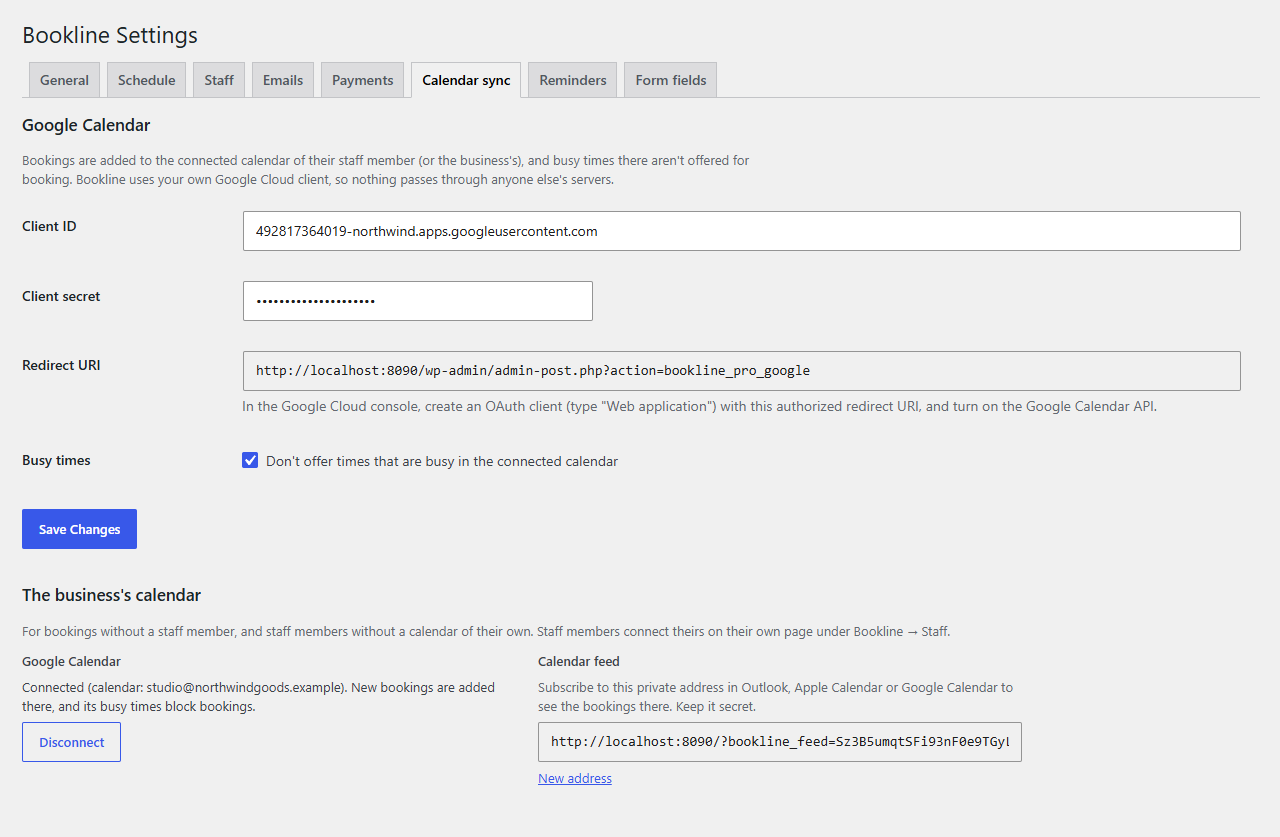
- APIs & Services → Credentials → Create credentials → OAuth client ID, type Web application. Under Authorized redirect URIs, add the Redirect URI shown on Bookline → Settings → Calendar sync.
- Copy the Client ID and Client secret into the Calendar sync tab, and save.
Connect a calendar
- The business's: Connect Google Calendar on the Calendar sync tab.
- A staff member's: Connect Google Calendar in the Calendar sync box on their page.
Sign in to Google and allow access. Bookings go to the account's main calendar.
What syncs
- New, moved, changed and cancelled bookings, within moments, in the background.
- Events Bookline adds show as "free" in Google, so they don't block bookings themselves.
- Busy times are checked every five minutes. Untick Don't offer times that are busy to stop that.
- If Google can't be reached, booking goes on as usual, and the booking's history says what went wrong.
Disconnect removes the connection (and Bookline's access in Google).
Calendar feeds
Each staff member, and the business, has a private calendar address: every booking from 30 days ago to a year ahead. Subscribe to it in Outlook, Apple Calendar or Google Calendar (From URL). Calendar apps refresh subscriptions on their own schedule (Google every few hours).
Keep the address secret. New address makes a new one and stops the old one working.