
Downloading a folder as a ZIP
Download every file in a Media Library folder, optionally with its subfolders, as one ZIP file.
Note
This is part of Folderline Pro.
Send a photographer's shoot to a printer, hand the press kit to a journalist, or keep a backup of a campaign: download the whole folder at once.
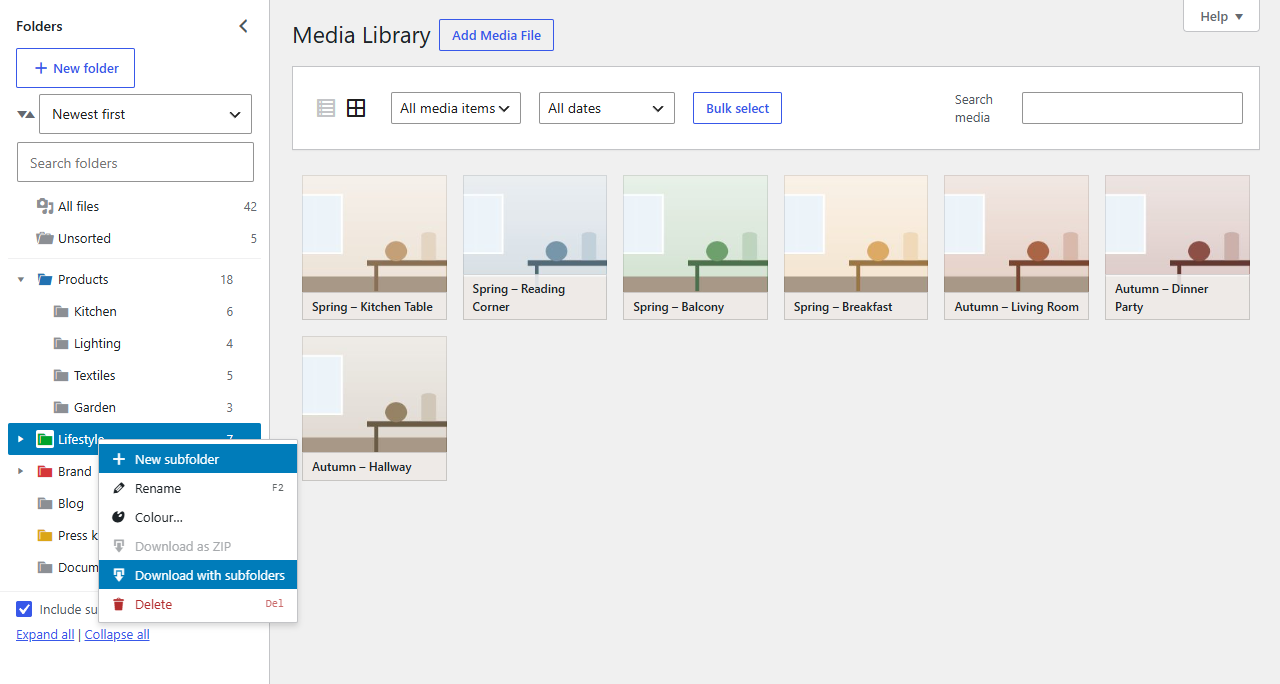
Downloading
- In the Media Library, open the folder's menu (right-click, the … button, or Shift+F10).
- Choose:
- Download as ZIP for the files in that folder, or
- Download with subfolders to include its subfolders. Each subfolder becomes a folder inside the ZIP.
Your browser downloads a ZIP named after the folder, such as Press-kit.zip.
What's in it
- The original files you uploaded, not the extra image sizes WordPress makes.
- Files with the same name in one folder are numbered:
photo.jpg,photo (2).jpg. - Files missing on the server are skipped.
Big folders
The ZIP is built on your server and streamed to your browser in pieces, and images and videos aren't compressed again, so even folders of several gigabytes work. Very large folders still take a while to put together before the download starts; keep the tab open.
Note
The download needs PHP's ZipArchive extension, which nearly every host has. If it's missing, the menu items aren't shown; ask your host to enable it.
Who can download
Anyone who can upload files, for folders they can see. With per-user folders on, that's their own folders and the shared ones.