
Installing Folderline Pro
Upload the Folderline Pro zip, activate it next to Folderline, enter your license key and choose the post types that get folders.
Note
This is part of Folderline Pro.
Folderline Pro is an add-on: it adds folders for posts, pages and custom post types, colours, per-user folders, ZIP downloads, sorting and imports to Folderline, which stays installed and keeps doing everything else. You need both.
Before you start
- Folderline 1.0.0 or later, installed and active. If you don't have it yet, install it from Plugins → Add New Plugin (search for "Folderline"); see Installation.
- The folderline-pro.zip file and the license key from your purchase email. Both are in the email Lemon Squeezy sent after you bought Folderline Pro.
Folderline Pro doesn't need WooCommerce. If WooCommerce is active, its products can have folders too.
Install and activate
- Go to Plugins → Add New Plugin and click Upload Plugin at the top.
- Choose
folderline-pro.zipand click Install Now. - Click Activate Plugin.
WordPress won't activate Folderline Pro while Folderline is inactive; it says what's missing instead. Activate Folderline first.
Enter your license key
Back on the Plugins screen, there's a box under Folderline Pro:
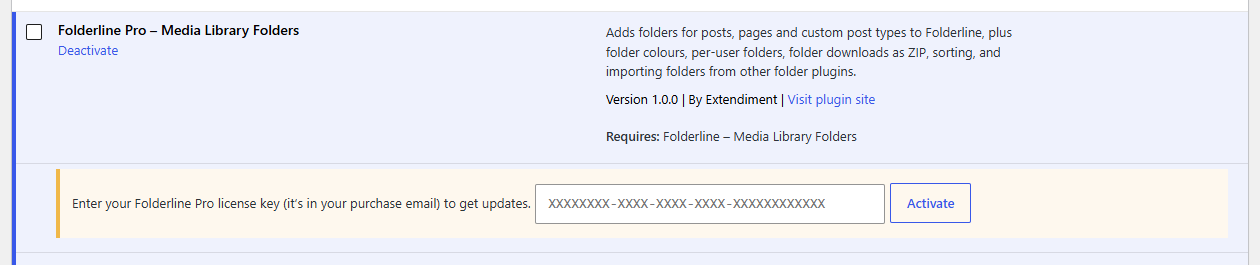
- Paste the license key from your purchase email.
- Click Activate.
The box turns green and shows the end of your key and, for a yearly license, the date your updates run until.
Note
Every feature works as soon as the plugin is active, with or without a license. The license is what lets WordPress download updates.
Choose where folders go
Go to Media → Folder Settings. In the Folderline Pro section, Folders for lists your post types; Posts and Pages are ticked to start with. Tick any others that should get folders, such as Products, and click Save Changes.
Then open Posts → All Posts: the folder tree is on the left, as in the Media Library. See Folders for posts and pages.
Coming from another folder plugin?
Your folders can come with you. See Importing from other plugins.