
Usage limits and results
Cap a rule by orders, by total discount or per customer, and see the orders each rule was used in and what it saved.
Note
This is part of Discountline Pro.
Results
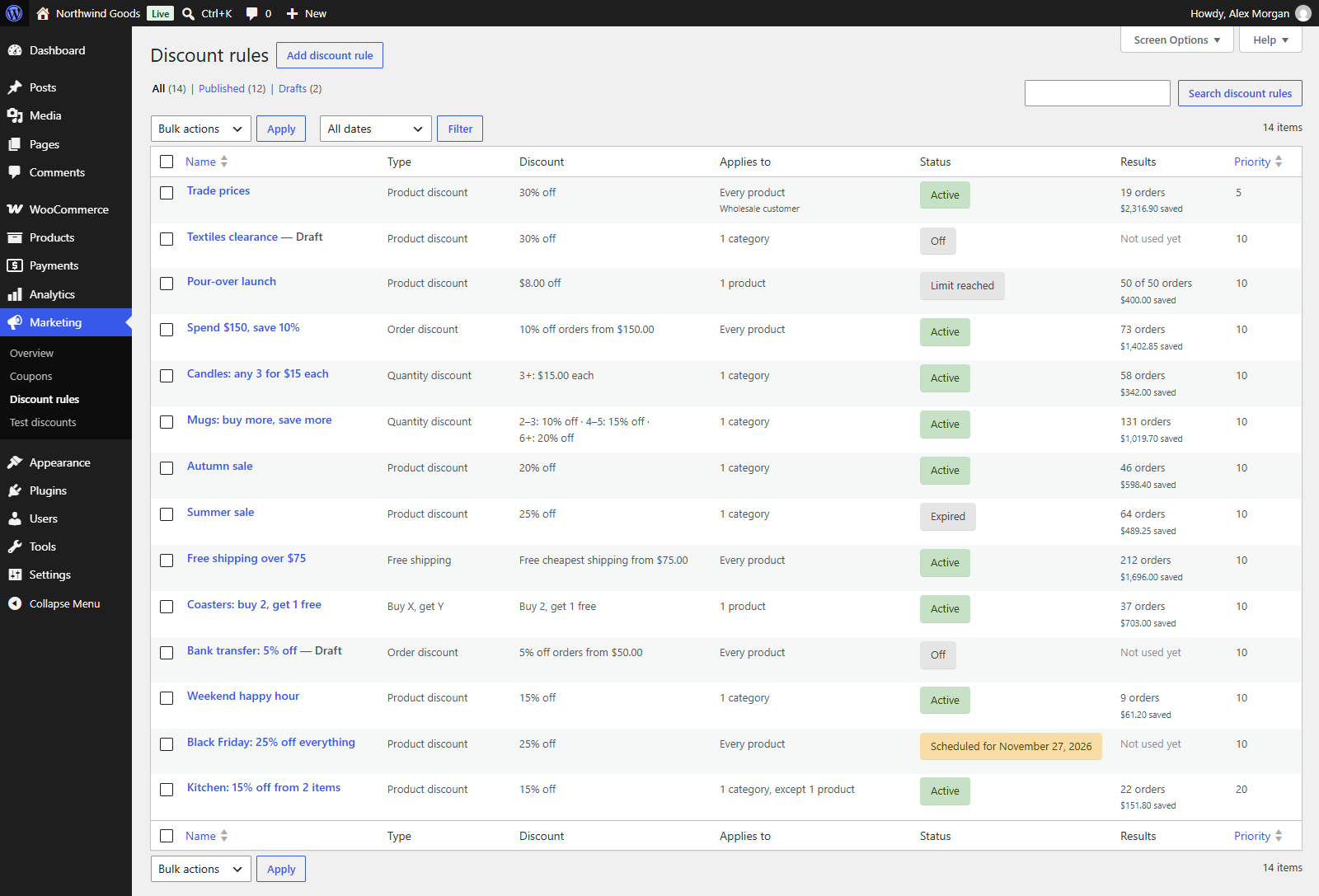
Every order placed with a discount counts towards the rule that gave it: once per order, with what it saved the customer (the item savings, the order discount, or the shipping cost it took off). Orders count when they're placed, at the classic checkout and the Checkout block alike.
You see the results:
- in the rule list's Results column: "131 orders, $1,019.70 saved", or "50 of 50 orders" for a rule with an order limit;
- at the bottom of the rule's Summary box: "Used in 131 orders, saving customers $1,019.70."
A duplicated rule starts from zero.
Usage limits
In a rule's Advanced box, Usage limits turn it off once it has been used enough:
| Limit | Turns the rule off when |
|---|---|
| orders in total | it has been used in that many orders ("the first 50 orders"). |
| in discounts in total | it has given that much in discounts, a promotion budget. |
| orders per customer | this customer (by account, or billing email for guests) has used it that many times ("once per customer"). |
Leave a limit empty for no limit. The order that reaches a limit still gets the discount; the rule stops for the next one. A rule that reached its total orders or budget shows Limit reached in the list.
To run a used-up promotion again, raise the limit, or duplicate the rule.