
Finding posts
Search titles and content, filter by status, month, author, category and tag, sort by a column, and page through the results.
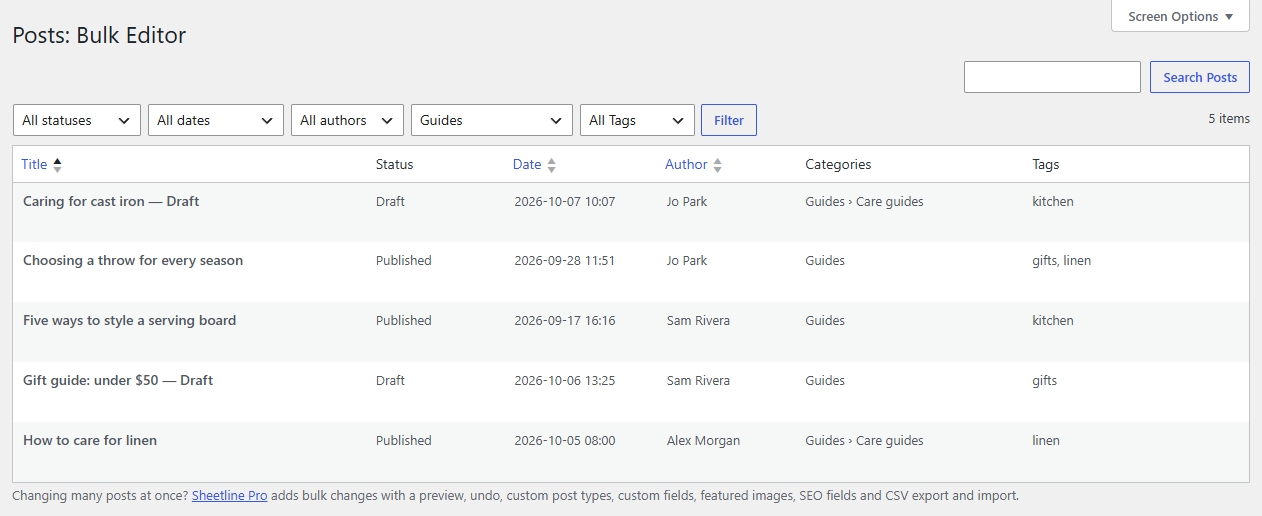
The grid shows your newest posts first. Search, filters and sorting narrow it down to the ones you want to work on.
Search
Type in the search box (top right) and press Enter or click the button. The search looks in titles, excerpts and content, as WordPress's own search does. Clear the box and search again to see everything.
Filters
Above the grid, choose any of:
- Status: published, scheduled, pending review, draft, private,
- Date: a month,
- Author,
- Category (subcategories included) and Tag, for posts; a custom post type gets a filter for each of its taxonomies,
then click Filter. Filters and the search work together: drafts in "Guides" with "linen" in them, for example.
Sorting
Click a column heading to sort by it, and again to reverse the order. These columns can be sorted:
- Title (alphabetically) and Slug
- Date
- Author
- Parent and Order (pages)
Other plugins' columns can be sortable too; Sheetline Pro's custom field columns are.
Pages
The number of posts found is shown at the top right, with the page links. Type a page number in the box and press Enter to jump to it. Choose how many posts a page shows (10 to 200) in Screen Options.
Note
Changing the page, search, filters or sorting reloads the grid, so Sheetline asks first if you have unsaved changes. Save them first to keep them.