
Temporary roles
Give someone a role until a date; it ends by itself.
Note
This is part of Roleline Pro.
Covering for a colleague, a seasonal helper, a trial membership: give the role with an end date and Roleline Pro takes it away when the date passes.
Give a role until a date
- Open the user under Users.
- In Roles, tick the role and choose the date next to it, under until.
- Click Update User.
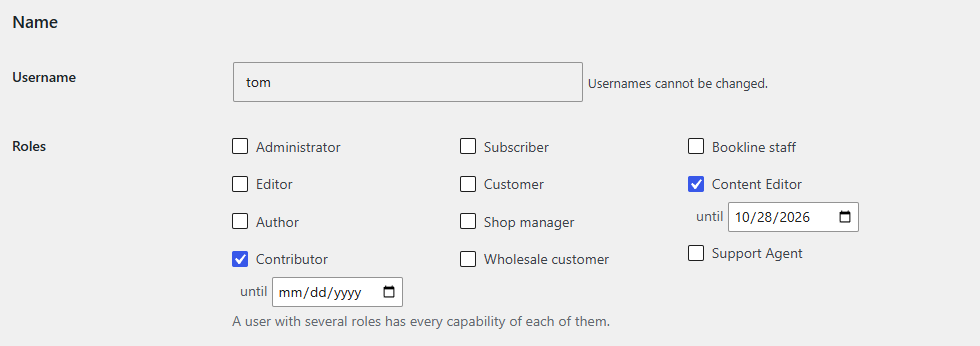
The role ends at the end of that day, in your site's time zone. Leave the date empty to make a role permanent.
You can set or clear dates only for roles you may hand out, and not on your own roles (administrators can).
The Users list shows the date after the role:
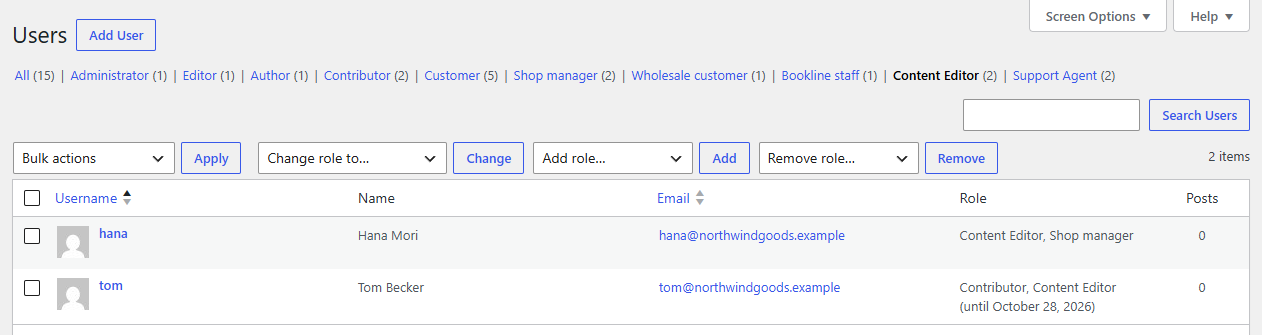
When it ends
An hourly check removes roles whose date has passed. If the user is using the site at that moment, the role goes on their next page load at the latest. Their other roles stay. If it was their only role, they're left with no role for the site (they can log in but do nothing), so it's often useful to keep a basic role such as Subscriber or Customer as well.
Taking the role away by hand (on the profile or with Remove role on the Users list) also forgets its date.
While Roleline Pro is inactive
Temporary roles don't end while Roleline Pro is inactive: Roleline lists the users who have them on Users → Roles, and offers to remove the ones whose date has passed.
REST API
GET, POST (role, until as YYYY-MM-DD) and DELETE (role: make it permanent) on /wp-json/roleline/v1/users/<id>/temporary.
For developers
The dates are the {prefix}roleline_pro_expires user option (role => Unix time). roleline_pro_role_expired ($user_id, $role) fires when one ends.