
Import and export
Move roles between sites as a JSON file, with a preview of what each imported role changes.
Users → Roles → Import and export moves roles between sites, for example from staging to the live site.
Export
Tick the roles to export (all of them to start with) and click Download Export File. The file is JSON:
{
  "format": "roleline-roles",
  "version": 1,
  "site": "https://northwindgoods.example/",
  "exported": "2026-10-08T14:22:33+00:00",
  "default_role": "subscriber",
  "roles": {
    "support_agent": {
      "name": "Support Agent",
      "capabilities": { "read": true, "moderate_comments": true }
    }
  }
}
Import
- Choose the file and click Upload and Preview. Nothing is saved yet.
- The preview lists every role in the file: New role, Replaces the existing role (with the capabilities it adds and removes) or Same as now.
- Untick the roles you don't want, and click Import Selected Roles.
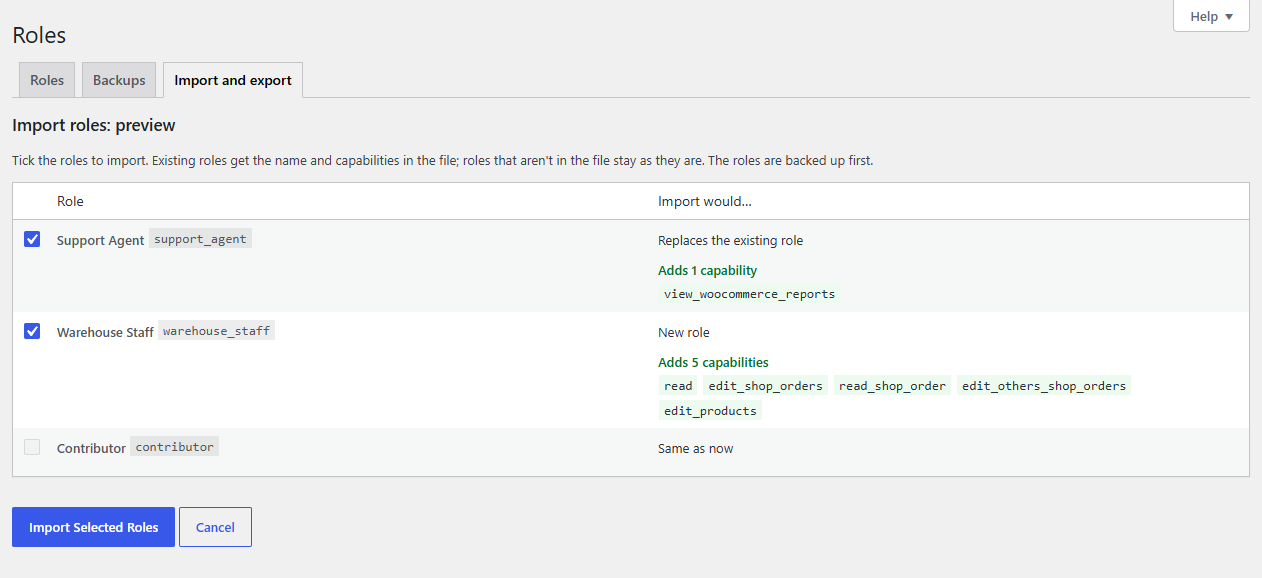
An existing role gets the name and capabilities in the file. Roles that aren't in the file stay as they are, and the default role isn't changed. The same checks as for any change apply: an import that would lock you out is refused, and a risky one needs your confirmation. The roles are backed up first.
Roleline also reads WordPress's own shape (the wp_user_roles option as JSON: slug, name and capabilities).
With WP-CLI
wp roleline export roles.json                       # every role
wp roleline export roles.json --roles=shop_manager,support_agent
wp roleline import roles.json                       # shows what changes, asks first
wp roleline import roles.json --yes
Users aren't moved
Only roles are exported. Users and which roles they have stay on their own site.