
Taking pre-orders
Switch pre-orders on for a product in its Pre-order tab, with a release date and a message of its own.
Every simple and variable product has a Pre-order tab in its Product data box. That's where a product starts taking pre-orders.
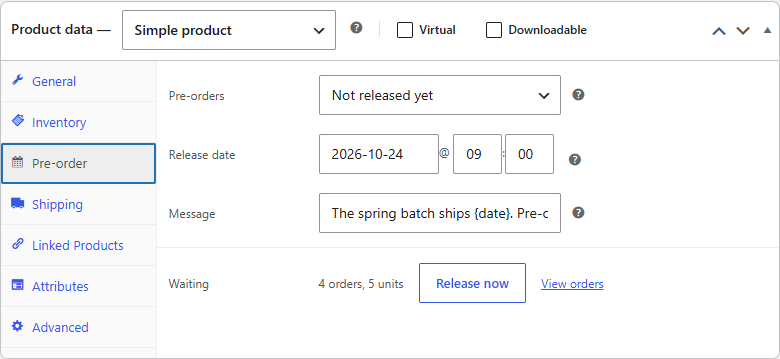
Pre-orders
| Setting | What it does |
|---|---|
| Off | The product sells normally. This is the default. |
| Not released yet | Everyone pre-orders until you release the product. Then it sells normally again. |
A product that's Not released yet takes pre-orders whatever its stock: it can have none at all.
Release date
The date (and, if you like, the time) the product is expected. Pick a day in the date picker, and type the hour and minute if they matter. Leave the time empty for midnight.
The date is optional. When there is one, shoppers see it on the product page, under each pre-ordered item in the cart and at checkout, on their order and in their emails. Without one, they're told it ships when it's available.
Change the date later and every customer with a waiting pre-order of the product gets an email with the new date. See Changing the release date.
Note
The release date is what you tell customers. Preorderline doesn't release the product by itself when the date passes: you release it, see Releasing pre-orders. (Automatic release on the date is part of Preorderline Pro.)
Message
Leave it empty to use the store's availability text, such as "Available for pre-order. Ships from March 3, 2027." Fill it in to say something else for this product, for example "Second batch: ships {date}". {date} is replaced with the release date.
What's waiting
Once the product has pre-orders, the tab also shows how many orders and units are waiting, with Release now and View orders.
Switching pre-orders off
Set Pre-orders back to Off and update the product. It sells normally from its stock again. Orders already placed keep waiting as Pre-ordered: release them from WooCommerce → Pre-orders, where the product stays listed while anything is waiting.