
Deposits
Take a deposit at checkout and bill the balance, with shipping and tax, when the pre-order is released.
Note
This is part of Preorderline Pro.
A deposit secures a pre-order without charging the full price months ahead. Customers pay part of the price at checkout and the rest when the product is released.
Set it up
- Set Customers pay to A deposit now, the rest when it's released: store-wide under WooCommerce → Settings → Products → Pre-orders, or for one product on its Pre-order tab.
- Set the Deposit: a percentage of the price, such as
20%, or an amount per unit, such as25. The store-wide value is the default; a product (or a variation) can have its own. A deposit is never more than the price. - Under Deposit refunds, choose whether customers are told the deposit is refundable. This only changes what they're told; refunds are made by you, from the order.
At checkout
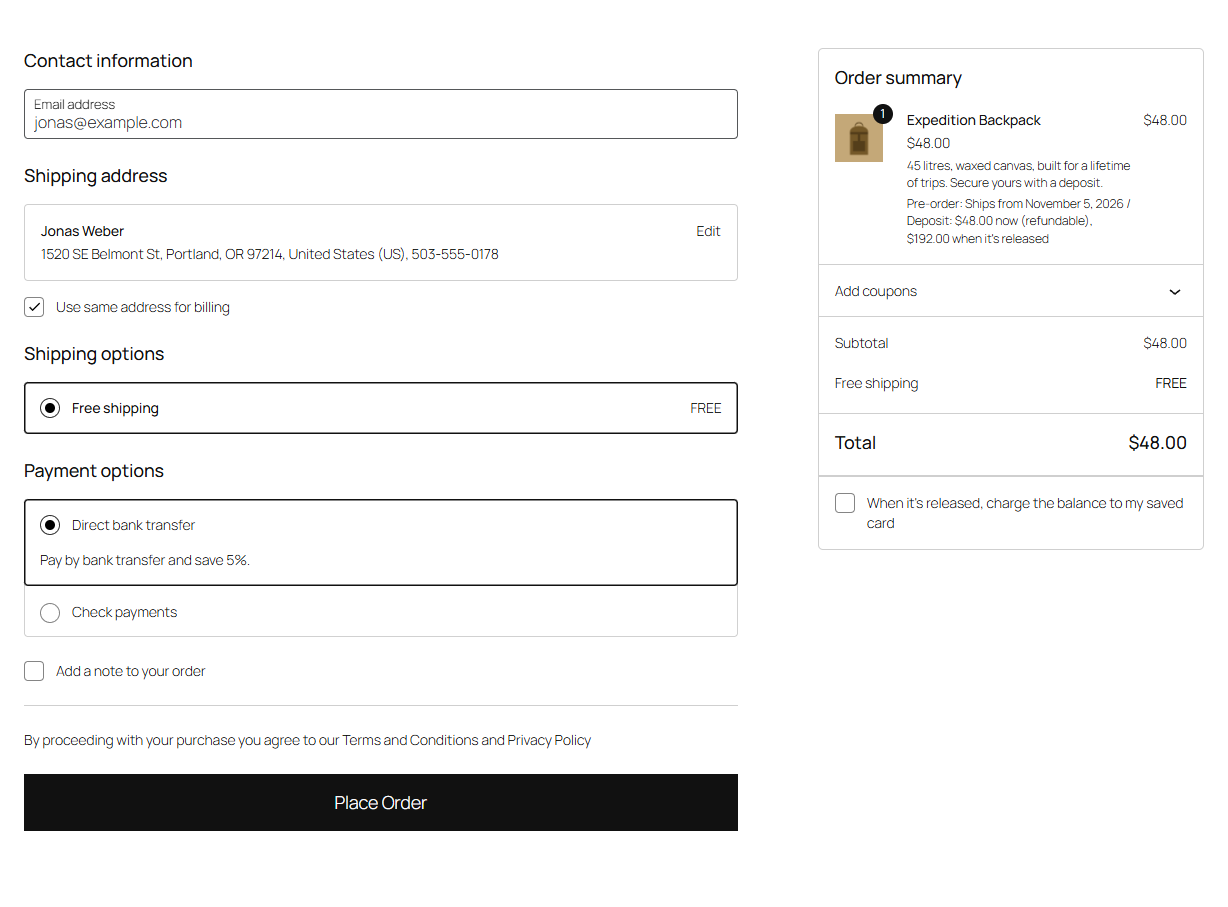
- The pre-order costs only its deposit, without tax. The cart shows "Deposit: $48.00 now (refundable), $192.00 when it's released" under the item.
- Shipping is chosen now and paid with the balance: shipping rates show "(paid with the balance)" and cost nothing yet.
- Customers pay the deposit with any payment method.
- Deposit pre-orders are checked out on their own, not mixed with other products.
The order waits as Pre-ordered. Its item shows "Deposit: $48.00 paid, $192.00 due when it's released", and the customer's order notice and Pre-order received email say what they've paid and what's left.
On release
When you release it, Preorderline Pro creates a balance order for the rest: the full price (with its tax), the shipping chosen at checkout (with its tax), less the deposit. Its lines are fees, so units aren't counted twice in your reports. Then:
- The pre-order goes On hold, linked to its balance order (and the other way round) on the order screen.
- The customer gets Pre-order balance due, with a Pay the balance button, and their order notice offers the same.
- Once the balance is paid, the pre-order moves to Processing and the customer gets Pre-order released. The balance order completes quietly, without WooCommerce's "order complete" email.
If nothing is left to pay (a 100% deposit and free shipping), the pre-order is released like a paid one.
Reminders
If the balance is still unpaid a few days after release, the customer gets Pre-order balance due again, as a reminder. Set the number of days under Balance reminder (3 by default; 0 for no reminder).
Charging the balance to a saved card
Logged-in customers with a card saved with the WooCommerce Stripe Gateway see a checkbox at checkout: When it's released, charge the balance to my saved card. If they tick it, the balance is charged on release to the card the deposit was paid with (if it's saved), else their default card. If that fails, they get the balance email with the link, saying why.
Cancelling
Cancel or refund the pre-order and its unpaid balance order is cancelled too, and the stock goes back. Refund the deposit from the pre-order if you've told customers it's refundable.
Recalculating a balance order
You can edit a balance order and click Recalculate like any order. The "Deposit paid" line stays untaxed, as it was paid without tax.