
Statistics
Downloads per day, the most downloaded files, versions and referring sites on Downloads → Reports, and the dashboard widget.
Note
This is part of Fileline Pro.
Fileline counts every download. Fileline Pro also keeps them per day, per version and per referring site, so you can see how downloads change over time.
Downloads → Reports
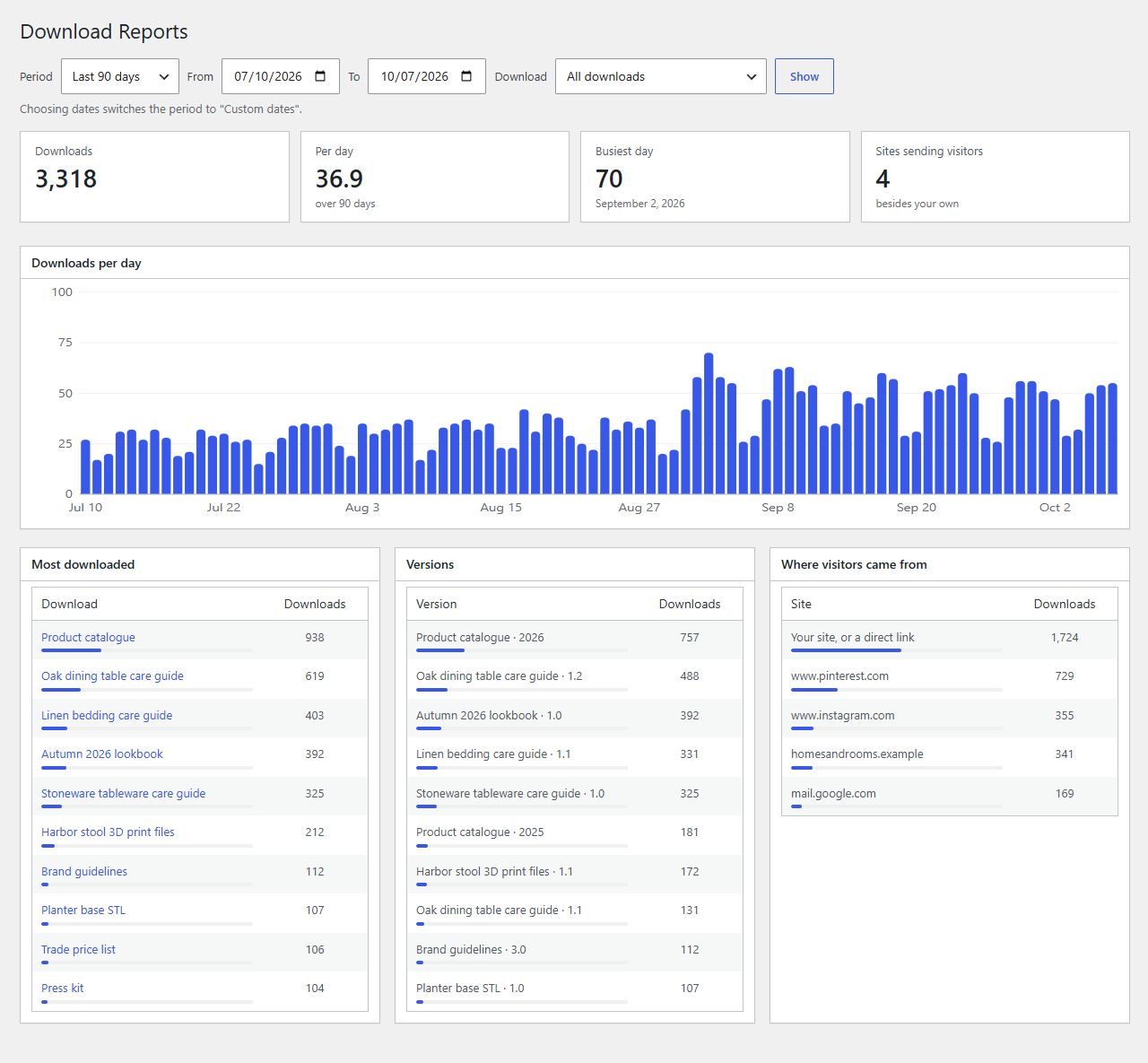
Choose a period (the last 7, 30 or 90 days, the last 12 months, or your own dates) and all downloads or one, then click Show.
- Downloads, with the change on the period before.
- Per day: the average.
- Busiest day.
- Sites sending visitors: how many other sites the downloads came from.
- Downloads per day: a bar chart. Point at a bar for its day and count.
- Most downloaded (for all downloads): click one to see its own report.
- Versions: downloads per version, to see how many people still get an old one.
- Where visitors came from: the referring sites. "Your site, or a direct link" counts downloads from your own pages and from emails, apps or bookmarks.
A download's Access box links straight to its statistics.
The dashboard widget
The Downloads widget on the Dashboard shows the last 7 and 30 days, a small chart and the five most downloaded files this month. Hide it from Screen Options at the top of the Dashboard.
What's recorded
Exactly what Fileline counts: no bots, no resumed parts, and repeat downloads only if Fileline counts them (see Counting and privacy). Fileline Pro records one total per day, download, version and referring site. Only the referring site's name is kept (such as news.example.com), never a full address, and nothing about who downloaded. Days follow your site's time zone.
Statistics start when Fileline Pro is activated; the download counts from before are in Fileline's totals.
Reports and the widget are for editors and administrators (edit_others_posts; change it with the fileline_pro_reports_capability filter).