
Roles and passwords
Downloads only some roles can get, and downloads with a password.
Note
This is part of Fileline Pro.
Both are in a download's Access box.
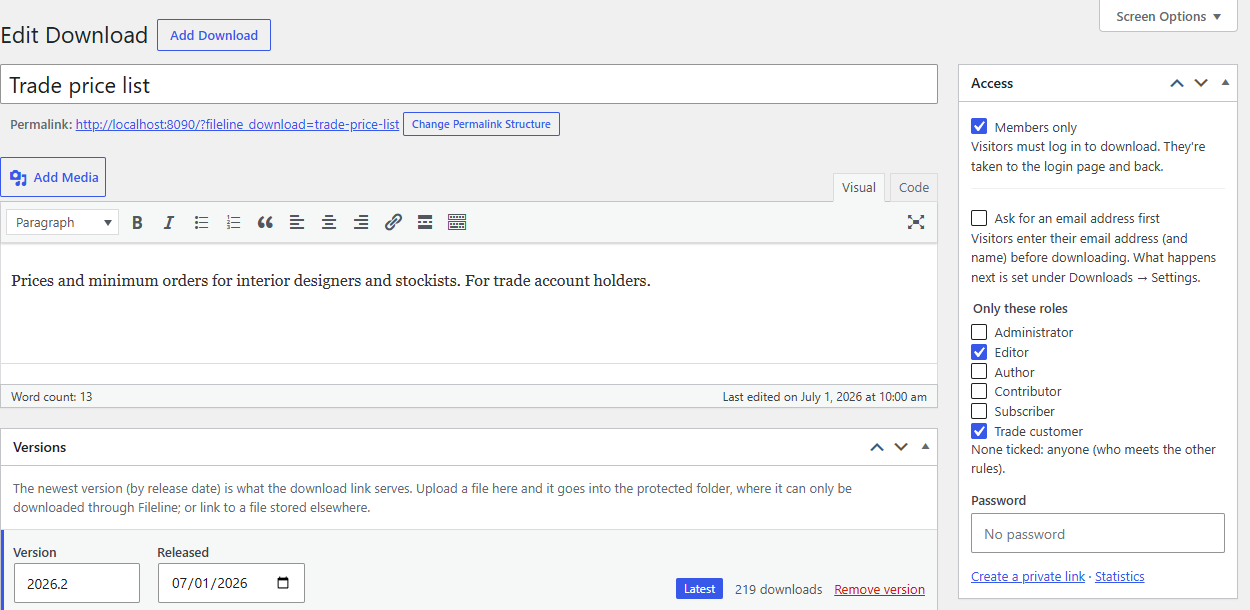
Only these roles
Tick the roles that may download the file, for example Editor and a Trade customer role. Then:
- visitors who aren't logged in are sent to the login page, and straight back to the download after logging in;
- logged-in people without one of the roles are told their account can't download it;
- people with one of the roles download it as usual.
Leave every role unticked for no role limit. Members only (from Fileline) is the simpler version: anyone logged in.
Any role on your site is listed, including roles made by other plugins. To make and manage roles of your own, such as "Trade customer" or "Press", use a role editor such as Roleline, Extendiment's role and capability manager. Membership plugins that decide access their own way can answer the fileline_pro_user_has_role filter instead.
Password
Enter a password and update the download. Visitors then enter it in a form in place of the button (or on the download's page) before the file downloads. Once entered, their browser remembers it for 10 days. Changing the password asks everyone again.
The password is stored scrambled (hashed), like WordPress account passwords, so it can't be read back: to change it, enter a new one. Leave the field empty to keep the current one; tick Remove the password to remove it. The form is protected by a limit of attempts per hour.
Combining rules
All the rules a download has apply, in this order: roles, then the password, then the email gate. People who can edit the download are never asked.
A private link from Downloads → Links opens the download whatever its rules: use one to give a single person access without a role, a password or an email address.