
Email gate and leads
Ask for an email address before a download, deliver the file straight away or by email, double opt-in, consent, spam protection, and the leads list with CSV export.
Note
This is part of Fileline Pro.
The email gate asks visitors for their email address (and name, if you like) before they can download a file. Each address is saved as a lead under Downloads → Leads.
Turn it on for a download
In the download's Access box, tick Ask for an email address first and update the download.
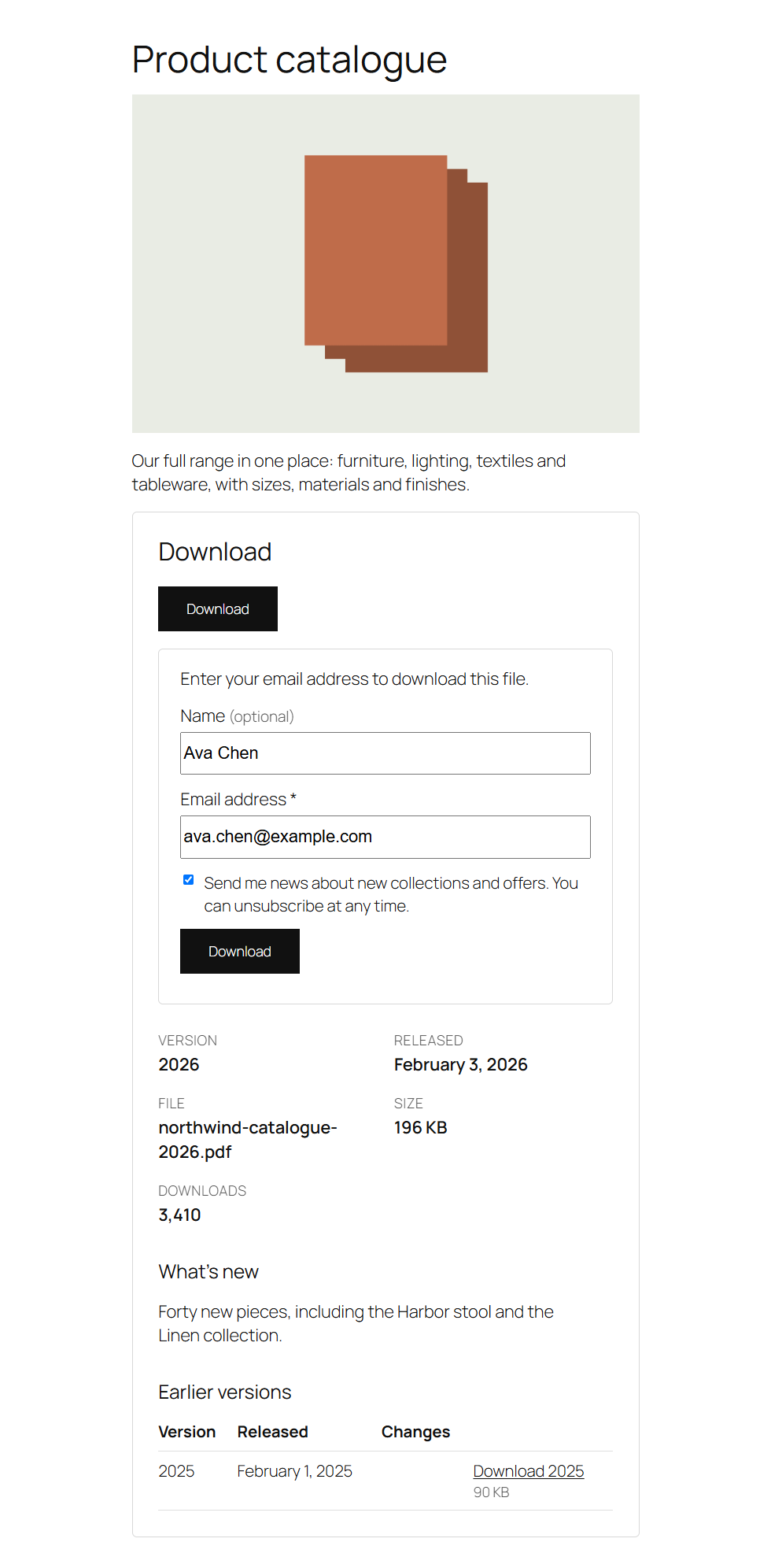
On your site the download button stays where it is. Clicking it opens the form in place; with JavaScript off, or when someone follows the download link from elsewhere, they're taken to the download's page with the form open. The form uses your theme's fields and buttons.
What happens after the address is given
Under Downloads → Settings → Email gate:
| Choice | What happens |
|---|---|
| Start the download straight away | The download starts as soon as the form is sent. The quickest for visitors. |
| Email the visitor a download link | Fileline Pro emails a link that works for the hours and number of downloads you set (48 hours and 3 downloads by default). This proves the address is real. |
| Double opt-in | New addresses first get an email asking them to confirm. Clicking the confirmation link confirms the lead and starts the download. Addresses already confirmed don't have to confirm again. |
After giving their address, visitors are remembered (a cookie in their browser) for the number of days in Remember visitors, so other gated downloads don't ask again. With the emailed link, they're remembered once they use the link. Set it to 0 to ask every time.
The form's fields
- Name: optional, required or not asked.
- Consent checkbox: enter the text visitors must agree to, for example "I agree to receive news and offers by email. See our privacy policy." Links are allowed. The text each lead agreed to is saved with the lead, so you can show what they agreed to. Leave it empty for no checkbox.
Spam protection
Without a CAPTCHA, the forms are protected by:
- a security token (nonce) in each form;
- a hidden field that people don't see but bots fill in;
- a limit of attempts per visitor per hour (Spam protection, 10 by default), counted under a scrambled form of the visitor's IP address.
Note
The security token is valid for about a day. If your pages are cached for longer than that, visitors on an old cached page are asked to reload it. Exclude the pages with gated downloads from long caching, or lower the cache's lifetime.
The emails
Under Downloads → Settings → Email gate emails, change the subject and text of the download link email and the confirmation email. They're plain text, sent with WordPress's mail (use an SMTP plugin for reliable delivery). Placeholders: {name}, {download}, {link}, {expires} and {site}.
The leads list
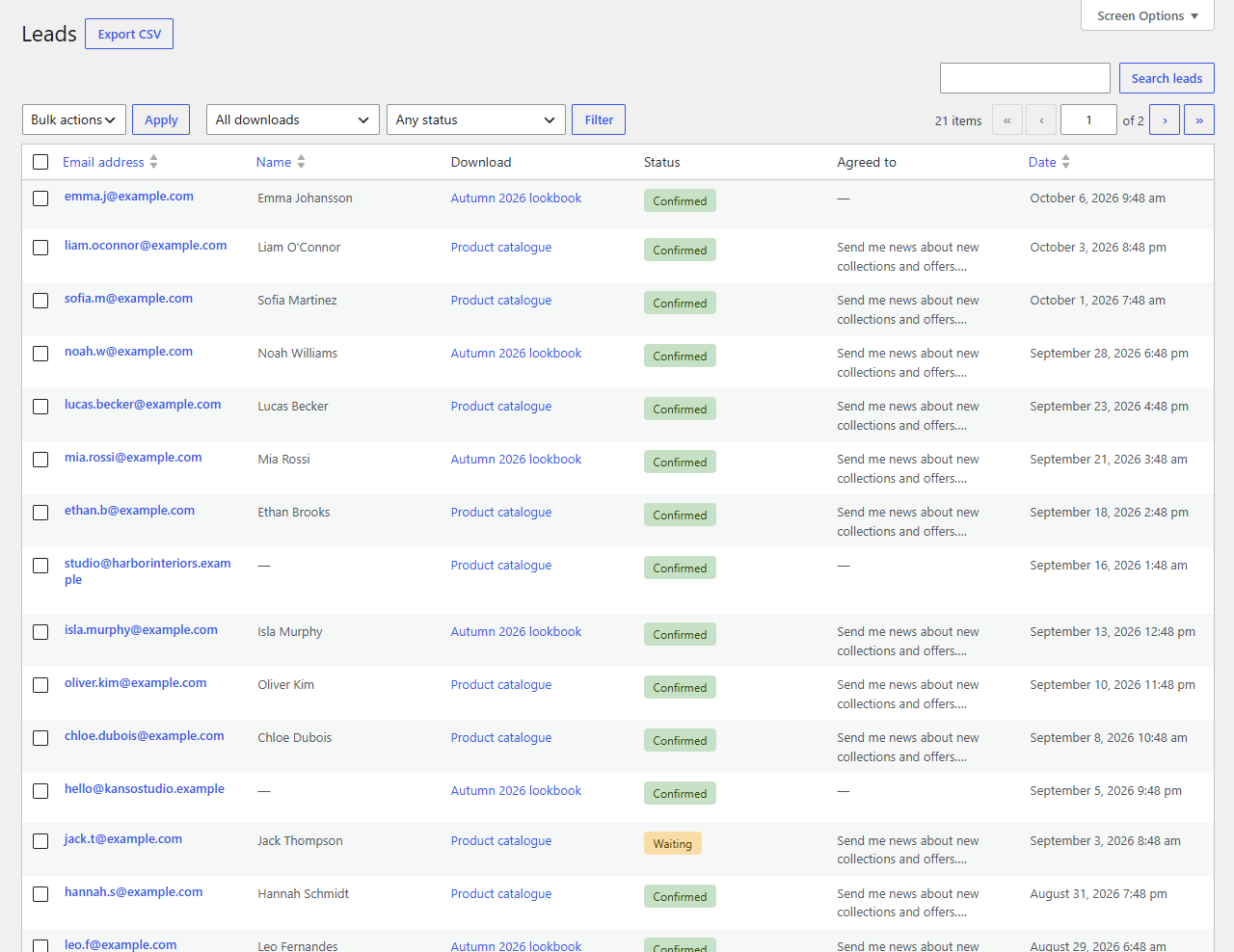
Downloads → Leads lists every address with the name, the download, whether it's confirmed, what they agreed to and when. Search by address or name, filter by download or status, delete leads one by one or in bulk.
Export CSV downloads the leads shown (with your search and filters) as a CSV file for a spreadsheet or a newsletter tool. Values that a spreadsheet would run as a formula are made safe.
To send new leads to a newsletter service automatically, use the fileline_pro_lead_added action (see Hooks below).
Privacy
Leads are personal data. Fileline Pro adds them to Tools → Export Personal Data and Tools → Erase Personal Data (by email address; erasing deletes the leads and the links emailed to them), and suggests a paragraph for your privacy policy under Settings → Privacy.
Hooks
| Hook | What it's for |
|---|---|
fileline_pro_lead_added (action) |
A new lead ($lead: id, email, name, download_id, consent, status, created_at). |
fileline_pro_email (filter) |
An email about to be sent ($email with to, subject, body, headers; $type link or confirm; $lead). |
fileline_pro_set_cookie (filter) |
Whether to set the "remember visitor" and password cookies. |
fileline_pro_leads_capability (filter) |
Who can see Downloads → Leads (edit_others_posts: editors and administrators). |