
Purchasing fields on products
Set each product's supplier, supplier SKU, cost price, reorder point and quantity, minimum order and pack size.
Supplyline adds a group of purchasing fields to the Inventory tab of every product, and to each variation's panel.
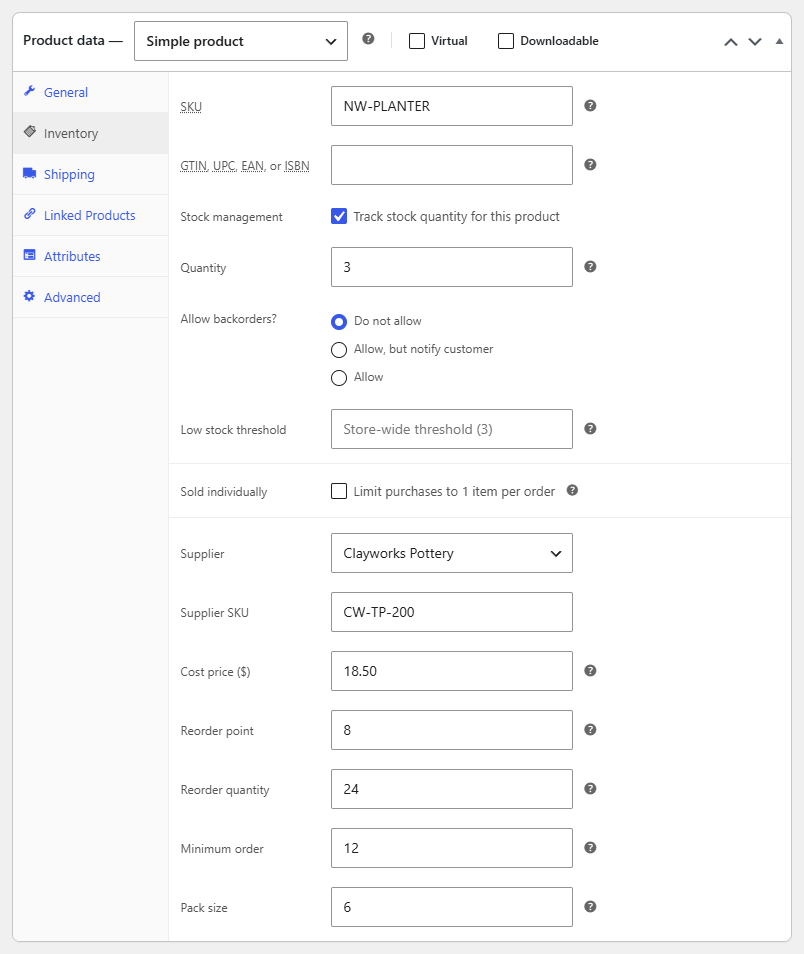
| Field | What it does |
|---|---|
| Supplier | Who you buy it from. A variation set to Same as the product uses its product's supplier. |
| Supplier SKU | The supplier's own code for it. It goes on the purchase order next to the product, so the supplier knows exactly what you mean. |
| Cost price | What a unit costs you, in your store's currency. New purchase orders use it as the unit cost. |
| Reorder point | The stock level at which you reorder. When stock plus stock already on order is at or below it, the product shows on To reorder. Leave it empty and the product is never suggested. |
| Reorder quantity | How many you usually order. Leave it empty to suggest just enough to get back above the reorder point. |
| Minimum order | The supplier's minimum order quantity. Suggestions are raised to it, and a draft flags a line below it. |
| Pack size | How many units come in a pack. Suggestions are rounded up to whole packs, and a draft flags a line that isn't. |
Variations without their own minimum order or pack size use their product's.
Note
The reorder point only works for products and variations with Track stock quantity on, since Supplyline needs a stock level to compare it with.
Choosing a reorder point
A good reorder point is what you sell while you wait for a delivery, plus a little extra. If a mug sells 2 a day and the supplier takes 14 days, set the reorder point to about 30: 28 for the wait and a few spare.
The Sold and Days left columns on To reorder help you check your points against real sales.
Many products at once
With Gridline, Extendiment's bulk product editor, supplier, supplier SKU, cost price, reorder point and reorder quantity are columns in its grid. Turn them on in Gridline's column picker, under Purchasing, to fill them in for many products and variations at once.