
Installing Supplyline Pro
Upload the Supplyline Pro zip, activate it next to Supplyline, and enter your license key.
Note
This is part of Supplyline Pro.
Supplyline Pro is an add-on: it adds supplier emails, currencies, landed costs, reordering from sales, several suppliers per product and Stockpool pools to Supplyline, which stays installed and keeps doing everything else. You need both.
Before you start
- WooCommerce and Supplyline 1.0.0 or later, installed and active. If you don't have Supplyline yet, install it from Plugins → Add New Plugin (search for "Supplyline"); see Installation.
- The supplyline-pro.zip file and the license key from your purchase email. Both are in the email Lemon Squeezy sent after you bought Supplyline Pro.
Install and activate
- Go to Plugins → Add New Plugin and click Upload Plugin at the top.
- Choose
supplyline-pro.zipand click Install Now. - Click Activate Plugin.
WordPress won't activate Supplyline Pro while Supplyline or WooCommerce is inactive; it lists what's missing instead. Activate those first.
Enter your license key
Back on the Plugins screen, there's a box under Supplyline Pro:
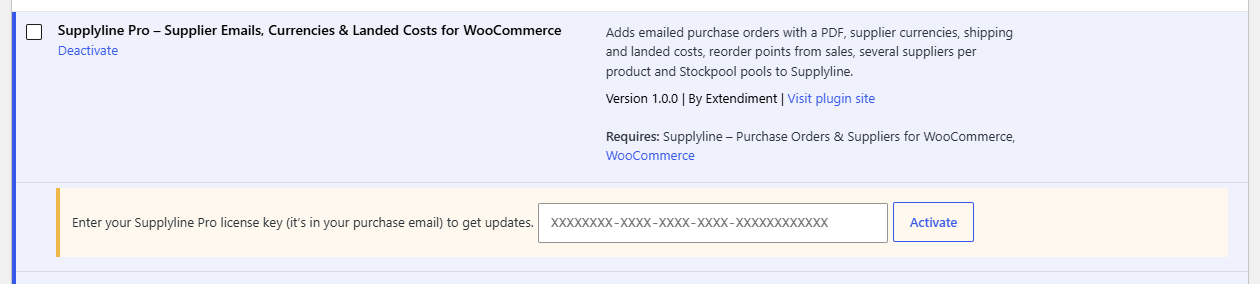
- Paste the license key from your purchase email.
- Click Activate.
The box turns green and shows the end of your key and, for a yearly license, the date your updates run until. See Licenses and updates for moving it to another site.
Note
The features work as soon as the plugin is active, with or without a license. The license is what lets WordPress download updates.
Check it works
- A purchase order's side box has Email it to the supplier above Mark as ordered, and a Download PDF link next to Print.
- A supplier's Details box has a Currency field.
- A product's Inventory tab has Other suppliers below the purchasing fields.
- WooCommerce → Settings → Products → Purchasing has From sales, Safety stock, Order enough for and a Receiving section.
While Supplyline Pro isn't active
Its data stays saved: other suppliers and cost histories on products, suppliers' currencies, the purchase order email's settings, the purchasing details of Stockpool pools and the reordering settings. Supplyline leaves them alone, and as soon as Supplyline Pro is active again they're all used, with nothing to re-enter.