
Stockline, Discountline and the sale badge
How Labelline works with WooCommerce's "Sale!" badge and with Extendiment's Stockline and Discountline, so no product shows the same thing twice.
WooCommerce shows a badge of its own on products on sale, and two other Extendiment plugins show badges too. Labelline works with each of them, so shoppers never see two sale badges on one image, or a stock label beside a stock line that says the same.
These settings are under WooCommerce → Settings → Products → Labels. The Stockline and Discountline rows only appear while those plugins are active.
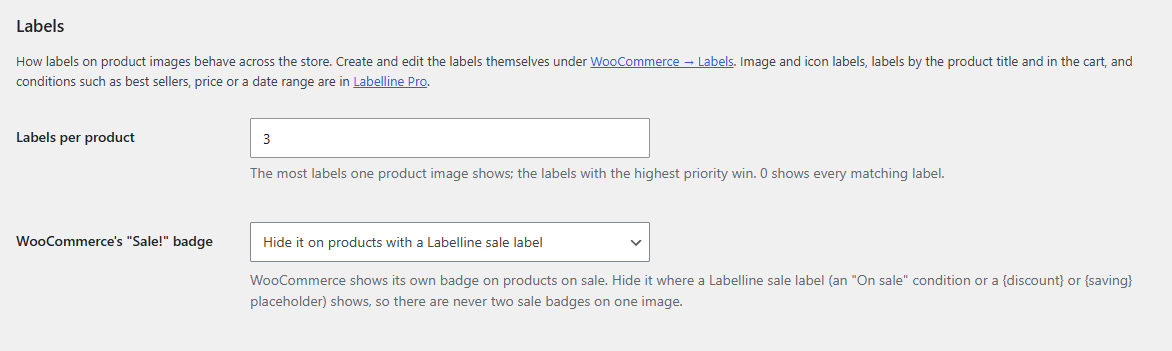
WooCommerce's "Sale!" badge
WooCommerce puts "Sale!" on the image of every product on sale: in classic themes, in the Product Image block and in the On-Sale Badge block.
The WooCommerce's "Sale!" badge setting:
| Choice | Does |
|---|---|
| Hide it on products with a Labelline sale label (default) | Where a product shows a Labelline sale label, in lists or on its page, WooCommerce's badge is hidden there. Products without one keep it. |
| Always hide it | WooCommerce's badge never shows; make your own sale label. |
| Always show it | WooCommerce's badge shows as usual, beside your labels. |
A sale label is a label with the On sale: yes condition, or with a {discount} or {saving} placeholder (with Labelline Pro, also the Sale ending soon condition or the {sale_ends} placeholder). A "New" label doesn't hide the sale badge.
Stockline
Stockline shows your own stock line ("Only 2 left, order soon", "Sold out, back soon") on the product page, as text or as a badge. It shows nothing in lists.
So the product page doesn't say it twice, labels with a stock condition (Stock status; with Labelline Pro, also Stock quantity) are left off the product page image while Stockline is active. They still show in the shop and product lists. Untick Stockline: Leave stock labels off the product page image to show them on the product page too.
Labelline has no stock message text of its own: for the words of the stock line, use Stockline.
Discountline
Discountline gives product discounts by rules and shows them as sale prices, with a badge after the price ("−20%", "Save $8.00").
- Its discounts count as sales for your labels: the On sale condition matches products with a Discountline discount, and
{discount},{saving}and{price}use the discounted price, measured from the regular price (so a product on sale with a Discountline discount on top shows the whole saving). Design the sale badge in Labelline and let Discountline do the pricing. - On products that show a Labelline sale label, Discountline's badge after the price is hidden, so the discount is shown once, on the image. Untick Discountline: Hide Discountline's badge next to the price… to show both.
This applies while Discountline is active and shows its discounts as sale prices (its Sale prices setting). Discountline's rules can depend on the customer (with Discountline Pro: roles, dates, past orders), so while Discountline is active Labelline checks the "On sale" condition on every page view instead of remembering it.