
Payment terms
Let trusted customers order now and pay later with Pay on account, with due dates, an account balance limit and the payments you record.
Customers with payment terms can choose Pay on account at checkout: they place the order without paying, you ship it, and they pay you within the number of days their account allows, by bank transfer or however you agree. Wholesaleline keeps track of what each customer owes until you record the payment.
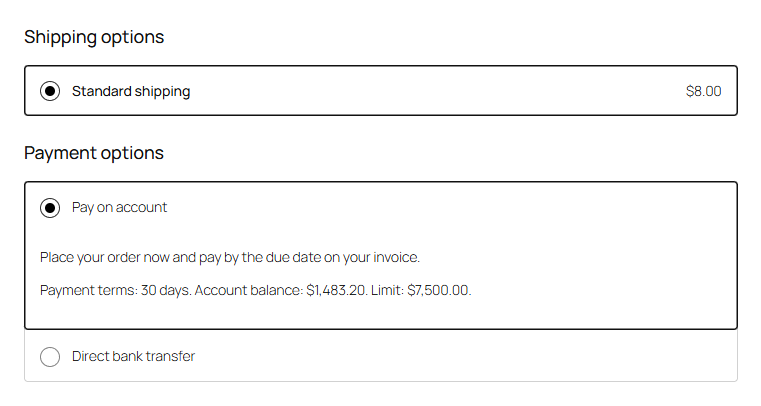
Give customers payment terms
- A whole group: edit the group under WooCommerce → Wholesale and enter the Payment terms in days, for example
30. Set an Account balance limit if you like. - One customer: on their profile, under Wholesale, enter their own Payment terms and Account balance limit. Empty: as their group. 0 days: no payment terms for them, whatever their group has. A customer doesn't need a group to have payment terms.
Pay on account is offered only to logged-in customers with payment terms. Everyone else never sees it.
Note
If a group's Payment methods are limited, tick Pay on account (payment terms) there too.
The payment method
Pay on account is under WooCommerce → Settings → Payments, switched on when you install Wholesaleline. There you can change its Title and Description. At checkout, customers see the description followed by their terms, for example "Payment terms: 30 days. Account balance: $1,483.20. Limit: $7,500.00."
It works in the Checkout block and the classic checkout. It isn't offered on the "pay for order" page.
What happens to an order on account
- The order is placed without payment and goes to Processing, so you can ship it. Stock is reduced as for any order.
- Its due date is the order date plus the customer's payment terms. "Payment terms: Payment due by (date)." shows on the order screen, in the order emails and on the customer's order page, with "Overdue." once the date has passed.
- The order counts toward the customer's account balance until you record the payment, even once it's Completed. WooCommerce treats it as not paid yet.
Over the balance limit
An order that would take the customer's account balance over their limit goes On hold instead, with a note giving the balance and the limit. The customer is told on the order confirmation that their order is on hold. To ship it anyway, change its status to Processing.
Record a payment
When the customer has paid:
- Open the order.
- Under Order actions, choose Record payment on account and click the arrow (Update).
The order says "Paid on account." from then on, its paid date is set to that day (until then, an order on account has none), a note is added, and it no longer counts toward the balance. Refunds also lower what's owed.
If the customer pays an order on account another way, for example by card after you send them a payment link from the order, it's marked paid when that payment goes through, with a note saying how it was paid. There's nothing to record.
Note
WooCommerce Analytics counts orders by the date they were paid, so an order on account shows in your reports on the day you record its payment, not the day it was placed. To count orders by the day they were placed, set Date type under Analytics → Settings to Date created.
What customers see
Under My Account → Wholesale account, customers see their payment terms, their account balance and limit, and the orders still to pay, with their due dates and any that are overdue.
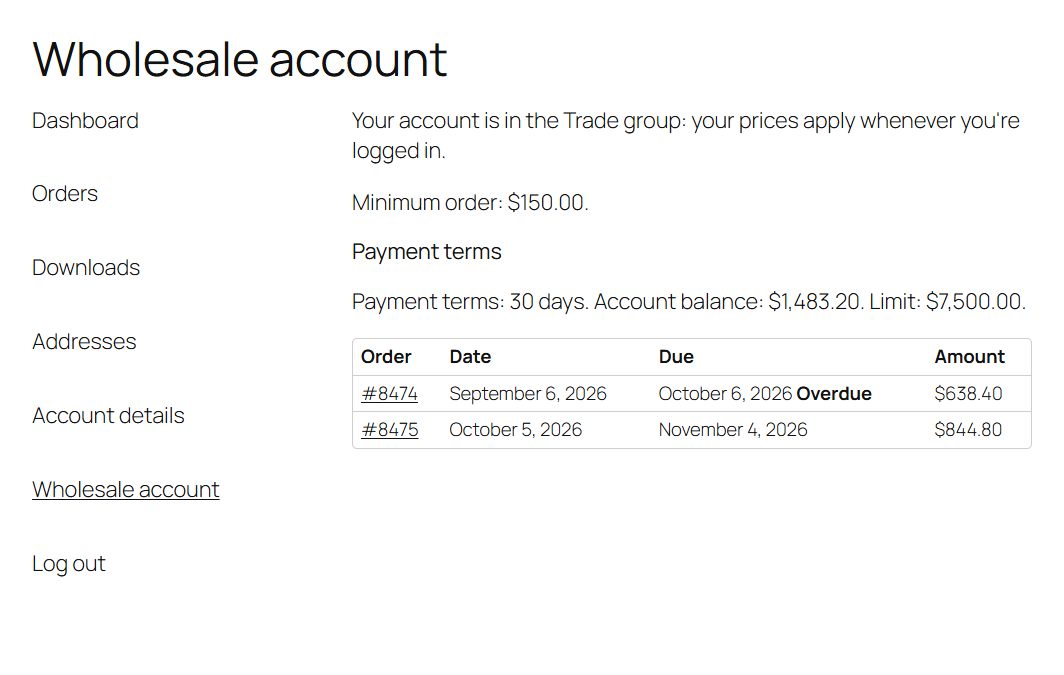
The customer's profile in the admin shows their account balance too, under Account balance limit.
Which orders count toward the balance
Unpaid orders placed with Pay on account in the statuses Processing, Completed and On hold, less any refunds. Cancelled, failed and fully refunded orders don't count.