
Using Wholesaleline
Managing customers
A customer's group, application, own price list, tax, payment terms and balance on their profile, and the Users screen's group column and bulk actions.
On a customer's profile
Open the customer under Users and scroll to Wholesale.
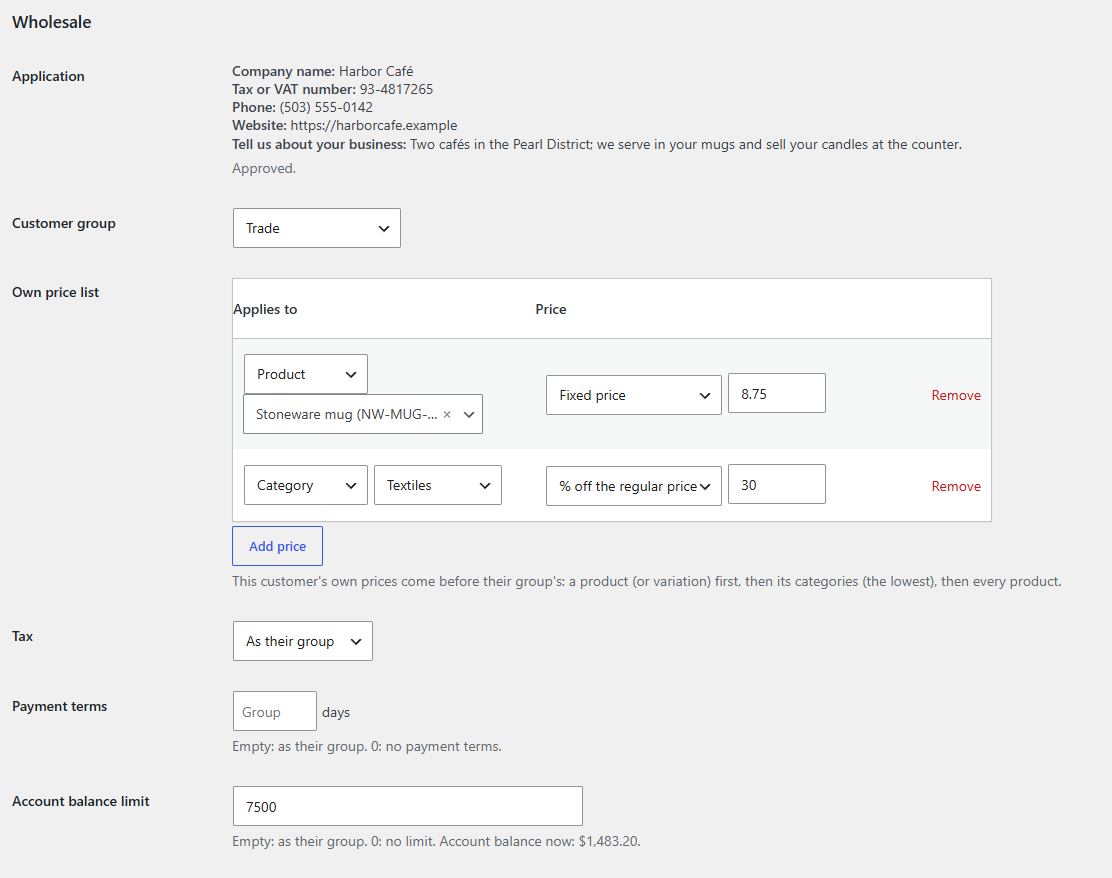
| Setting | What it does |
|---|---|
| Application | Their answers, if they applied. A waiting application has Approve into (group) buttons for each group, and Decline. |
| Customer group | Their group, or None (regular prices). |
| Own price list | Prices for this customer alone, which come before their group's. See How prices are worked out. |
| Tax | As their group, Exempt from tax or Pays tax. See Tax exemption. |
| Payment terms | Their own days to pay. Empty: as their group. 0: no payment terms. See Payment terms. |
| Account balance limit | Their own limit. Empty: as their group. 0: no limit. The description shows their account balance now. |
Click Update User to save. Only users who can manage WooCommerce see and change this section.
On the Users screen
- The Wholesale group column shows each customer's group, or Applied for a waiting application.
- The role filter at the top lists each group, with its number of customers.
- Bulk actions has Add to group: (name) for each group, and Remove from wholesale group.
Customers keep their own role when they join a group, so nothing else about their account changes.