
Conditional fields
Show a field only when another field's value is, isn't, contains something, or is filled in; checked again on the server.
Note
This is part of Optionline Pro.
A conditional field only shows when other fields have certain values: a Card message once Gift box is ticked, an Engraving font once something is typed in Engraving, a Custom size only when Size is "Custom".
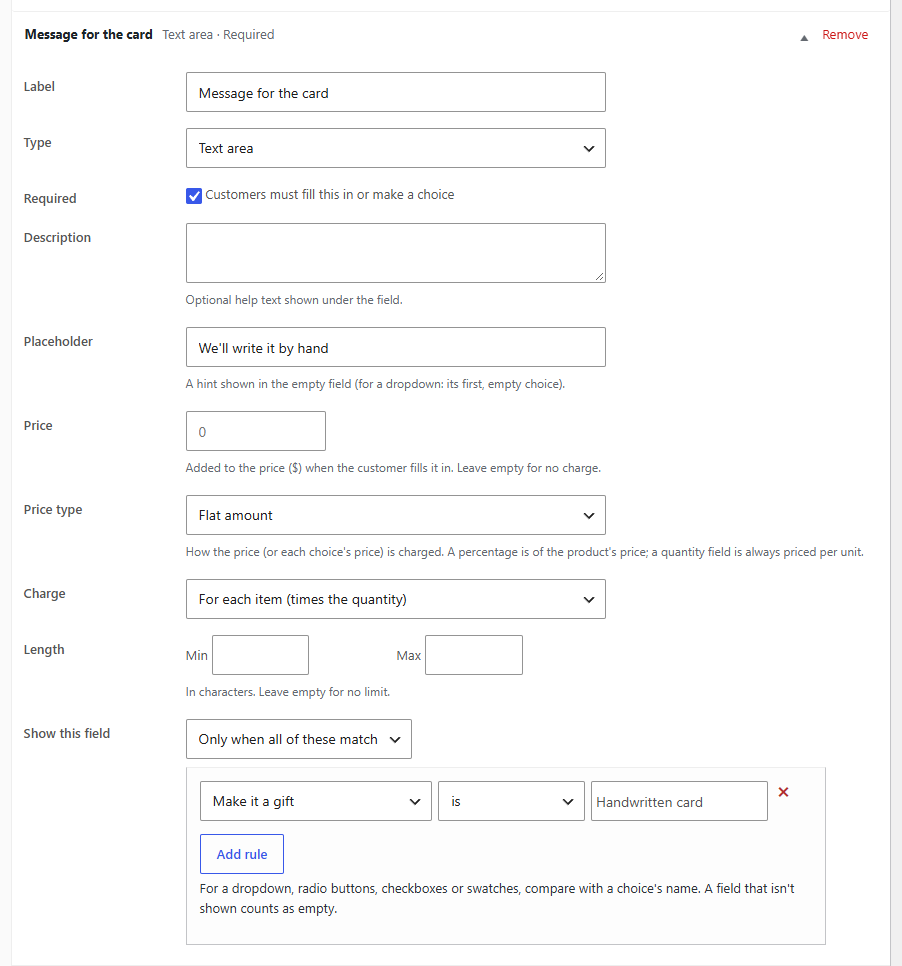
Setting it up
In the field's box, find Show this field:
- Choose Only when all of these match or Only when any of these match.
- A rule appears. Choose the field it looks at, the condition, and the value.
- Add rule for more.
- Update the product (or the group).
Always (the default) shows the field whatever the other fields say.
| Condition | Matches when the other field… |
|---|---|
| is | has exactly the value. For a dropdown, radio buttons or swatches, the chosen choice's name; for checkboxes, one of the ticked choices. |
| is not | doesn't have the value (an empty field counts as "not"). |
| contains | has the value somewhere in it: in the text, or in a chosen choice's name. |
| is filled in | has any value: text typed, a choice made, a box ticked, a file chosen. |
| is empty | has no value. |
Case and spaces around the value don't matter: "gift box" matches "Gift box".
On the product page
The field appears and disappears as the customer chooses, and the live total only counts fields that show. A hidden field isn't sent with the form.
On the server
When the product is added to the cart, the store works the conditions out again from what was sent, whatever the browser did:
- A field that doesn't show is never required, never stored on the cart line and never charged, even if a value for it was sent.
- A field that doesn't show counts as empty for other fields' conditions, so chains work: the card's font only shows when the card shows.
- Conditions that point back at their own field (directly or through others) never show the field.
Without Optionline Pro
If Optionline Pro is deactivated, conditional fields are kept but not shown in your shop, rather than shown (and required, or charged) for everyone. They're back when Pro is active again.