
Attribute rules
Link every product with an attribute value to a pool at once, including products you add later, with categories, several attributes and "Any" variations.
Note
This is part of Stockpool Pro.
Linking products one by one is fine for a few. When every red variation of every product uses the red fabric, a rule does it in one go, and keeps doing it for products you add later.
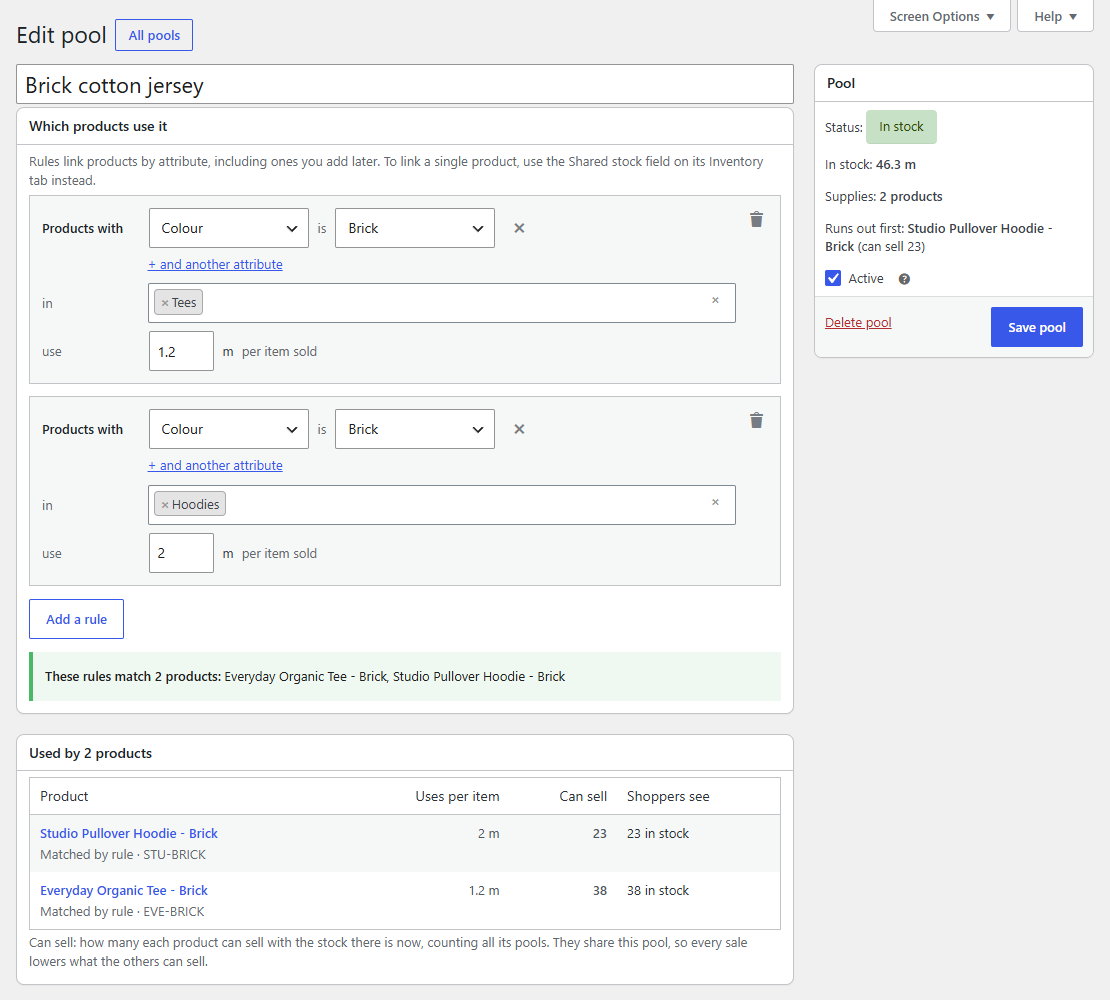
Adding a rule
- Open the pool on Products → Shared stock.
- In Which products use it, click Add a rule.
- Choose an attribute and a value: Products with Colour is Brick. Global attributes (Products → Attributes) offer their terms; a product's own attributes take the value as text.
- Optionally, pick categories: in Tees. Leave it empty for any category.
- Enter what one item uses: use 1.2 m per item sold.
- Click Save pool.
As you edit, a preview under the rules lists the products they match, before you save. After saving, Used by lists every matched product, marked Matched by rule.
More than one condition
- + and another attribute narrows a rule: Colour is Red and Size is XL. A product needs every value.
- Several rules on one pool work as alternatives, each with its own amount. A fabric pool can have Colour is Brick in Tees, 1.2 m and Colour is Brick in Hoodies, 2 m. The first rule a product matches sets its amount.
- Categories alone work too: a rule with no attribute and the category Gift sets links every product in it.
How rules match
- A simple product matches on its attributes and categories.
- A variation matches on its own values plus its product's other attributes, and its product's categories.
- A variation set to "Any colour" matches on the colour the shopper picks: on the product page as they choose, in the cart and in the order. The product page shows the right stock for each colour as it's picked.
- Values compare without regard to case or spaces: "Organic cotton" matches "Organic Cotton".
- A product linked to a pool on its Inventory tab keeps that amount, even if a rule of the same pool also matches it.
On the product's Inventory tab, pools that apply by rule are listed under Also uses, linked automatically, read only.
Changing or removing rules
Change a rule and save: products that start or stop matching update their stock status straight away. Orders already placed keep the pools they took from, so cancelling or refunding them still returns stock to the right pool.
If Stockpool Pro is deactivated
Rules stay saved on the pool, but Stockpool doesn't act on them: products linked only by a rule no longer use the pool, and their stock status is put right shortly after. The pool's page says how many rules it has saved. Activate Stockpool Pro and they work again.