
Local pickup
A schedule of its own for orders customers collect, with or without time slots.
Note
This is part of Slotline Pro.
With Slotline Pro, customers who choose to collect their order are asked when they'll come: a pickup date, and a time slot if you use them. Pickups have their own schedule, separate from deliveries, so your counter's hours don't have to match your vans'.
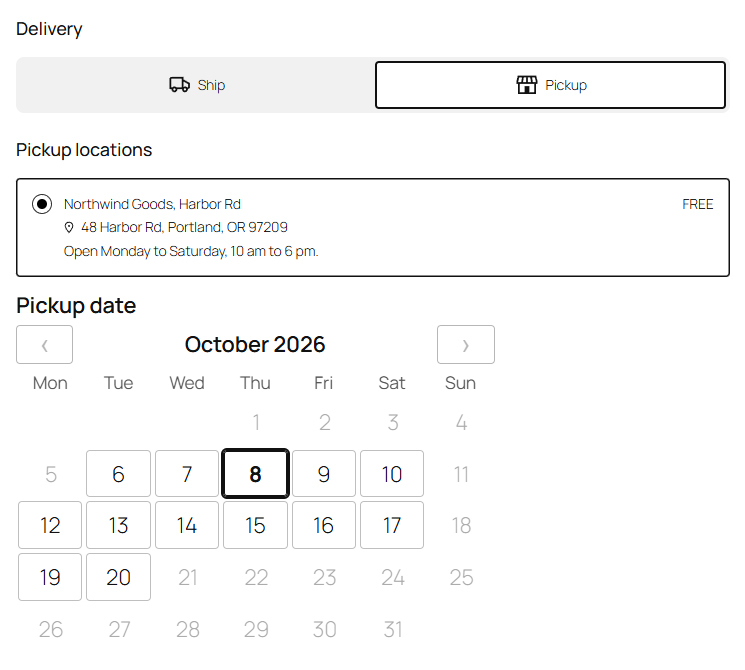
Which orders it's for
Orders whose shipping method is Local pickup, or one of the Checkout block's pickup locations (WooCommerce → Settings → Shipping → Local pickup). Every other shipping method follows the Delivery schedule.
Setting it up
Go to WooCommerce → Settings → Shipping → Delivery dates and find the Pickup schedule section, below the Delivery schedule. It has the same settings as the delivery schedule (see The delivery schedule):
- Pickup dates and Required.
- Open days: when you're open for collection.
- Time slots with capacity (and a fee, see Fees for premium slots). Remove every row and customers choose a date only, which suits a shop that's simply open all day.
- Minimum notice, Book ahead and Orders per day.
Out of the box, pickups run Monday to Saturday in two slots, 10 am to 2 pm and 2 pm to 6 pm, with 2 hours' notice: enough to pack an order the same day. Change them to your opening hours and save.
Closed dates apply to pickups too.
What customers see
At checkout the picker is titled Pickup date, and it appears under the pickup options. On the order, the line reads "Pickup: Tuesday, June 4, 2:00 pm – 6:00 pm", in the order confirmation, My Account and the emails.
When a customer switches between delivery and pickup, the date they chose for one is cleared, and they choose again for the other.
Several pickup locations
All pickup locations share the Pickup schedule. To give one location different hours or capacity, add a schedule for it under More schedules (type Pickup, "For": that location). See More schedules.
Without Slotline Pro
If Slotline Pro is deactivated, pickups are no longer asked for a date. Orders already booked for a pickup keep their date and slot, and show them as before.