
Customers change their time
Customers move their order to another date or slot from My Account, until your minimum notice.
Note
This is part of Slotline Pro.
Plans change. With Slotline Pro, customers can move their delivery or pickup to another time themselves, instead of emailing you.
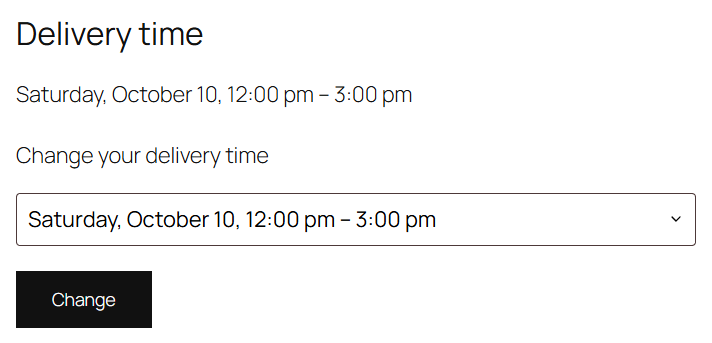
What customers see
On their order's page in My Account, under the order details, there's a Delivery time (or Pickup time) section with the current booking and a list of other times. They choose one and click Change; the page confirms "Your delivery time has been changed."
The reminder email links straight to it.
What they can choose
- Dates and slots of the same schedule the order was booked in, with the same rules as the checkout: open days, closed dates, notice, how far ahead, and the products' preparation times.
- Only slots with the same fee as the one they booked, so the order total never changes after payment.
- Only slots with room. Their current slot is always in the list, even when it's full (it's their place).
When they can change it
- While the order is pending payment, processing or on hold. Not once it's completed, cancelled or refunded.
- Until the schedule's minimum notice before the booking. With 24 hours' notice, a 9 am slot can be changed until 9 am the day before.
- Not when the order's schedule has been deleted since.
What you see
Each change is added to the order notes, e.g. "Delivery changed by the customer from Wednesday, June 5, 9:00 am – 12:00 pm to Friday, June 7, 12:00 pm – 3:00 pm." The Deliveries page and the orders list show the new time straight away, and the reminder email is sent again for it.
Switching it off
Under WooCommerce → Settings → Shipping → Delivery dates → Customers, untick Changing their time. You can still change any order's time on the order screen.
For developers
slotline_change_statuses filters the order statuses that can be changed (without "wc-"), and the slotline_customer_changed action fires after a change, with the order and the old booking's label.