
The index
What is in Searchline's search index, how it stays up to date, and how to rebuild it.
Searchline searches its own index rather than your posts table. The index is built when you activate Searchline and updates itself whenever something changes, so most shops never need to touch it.
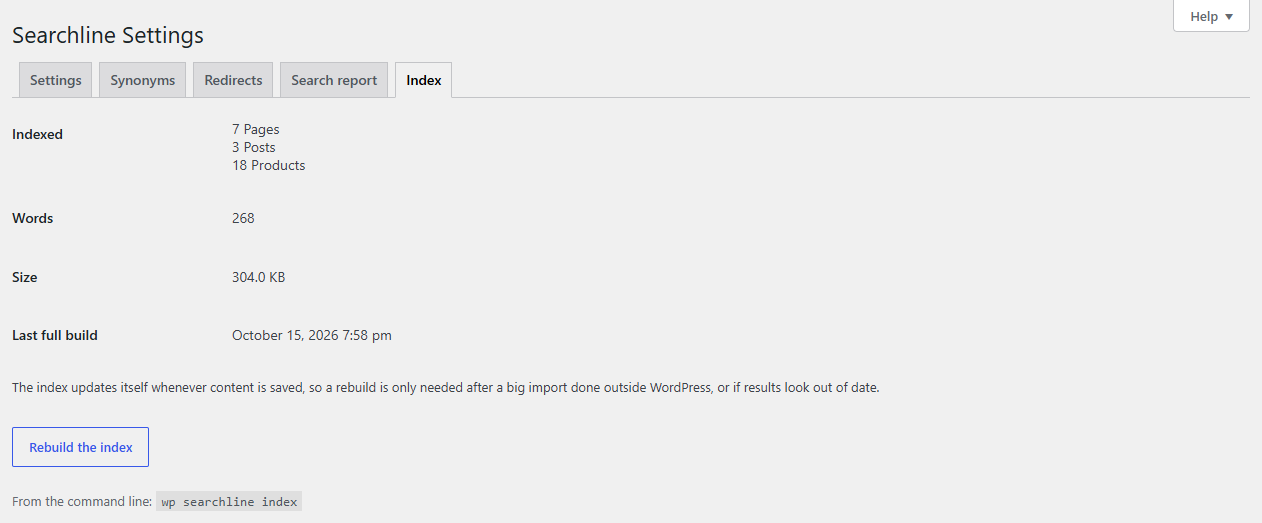
See what is in the index
Go to WooCommerce → Searchline → Index:
| Row | What it shows |
|---|---|
| Indexed | How many of each content type are in the index, for example "1,240 Products". |
| Words | How many different words the index knows. |
| Size | How much space the index takes in your database. Not shown when the database doesn't tell. |
| Last full build | When the index was last built from scratch. |
How it stays up to date
The index updates itself when:
- a product, page or post is published, saved, unpublished, trashed or deleted;
- its categories, tags, SKU, attributes or searched custom fields change, or one of its variations changes;
- a category, tag or attribute value is renamed (its products are updated in the background).
Stock needs no update: whether a product is in stock is checked at the moment of each search.
Up to 100 changes at once are indexed straight away. Bigger changes, such as a bulk edit or an import, are indexed in the background, in batches.
Saving new settings for what is searched, the weights or the two-typo length rebuilds the whole index in the background.
Rebuild the index
A rebuild is only needed after a big import done outside WordPress (straight into the database), or if results look out of date.
- Go to WooCommerce → Searchline → Index.
- Click Rebuild the index.
The notice "The index is being rebuilt in the background. Searches keep working meanwhile." appears. Under it, a progress bar and "Indexed … of … posts…" follow the build, with a spinner next to the button. Searches use the current index until the rebuild is done, and you can leave the page: the build goes on without it.
While a build is running, the button says Restart the build and starts it again from the beginning.
The build runs in the background with WooCommerce's scheduled actions, and moves on faster while the Index tab is open. When it's done, the bar is full and the message says "The index is ready. Reload the page to see its numbers." The other Searchline tabs show the progress in a notice.
Note
Before the very first build has finished, Searchline leaves searches to WordPress, and every Searchline tab says "Searchline is building its index. Until it is done, searches use WordPress's own search." If no build is running and the index has never been built, it says "The index hasn't been built yet, so searches use WordPress's own search. Build it on the Index tab."
From the command line
With WP-CLI on your server, the same tools are available as commands:
| Command | What it does |
|---|---|
wp searchline index |
Builds the whole index now, showing its progress. Searches keep working while it runs. |
wp searchline status |
Shows how many documents and words are in the index, its size and the state of the last build. |
wp searchline search "linen apron" |
Searches the index and lists the first 20 results with their type and title. Add --type=product to search one content type. Shows a "Did you mean" when nothing is found. |
wp searchline clear |
Empties the index. Searches go to WordPress until it is built again. |
Tip
On a large shop, wp searchline index is the quickest way to build the index after moving the site.