
Synonyms
Let a search find words your products don't use, with two-way and one-way synonyms.
Visitors don't always use your words. Someone searching for "couch" won't find your sofas, and "pot" won't find your planters. Synonyms fix that without changing your product names.
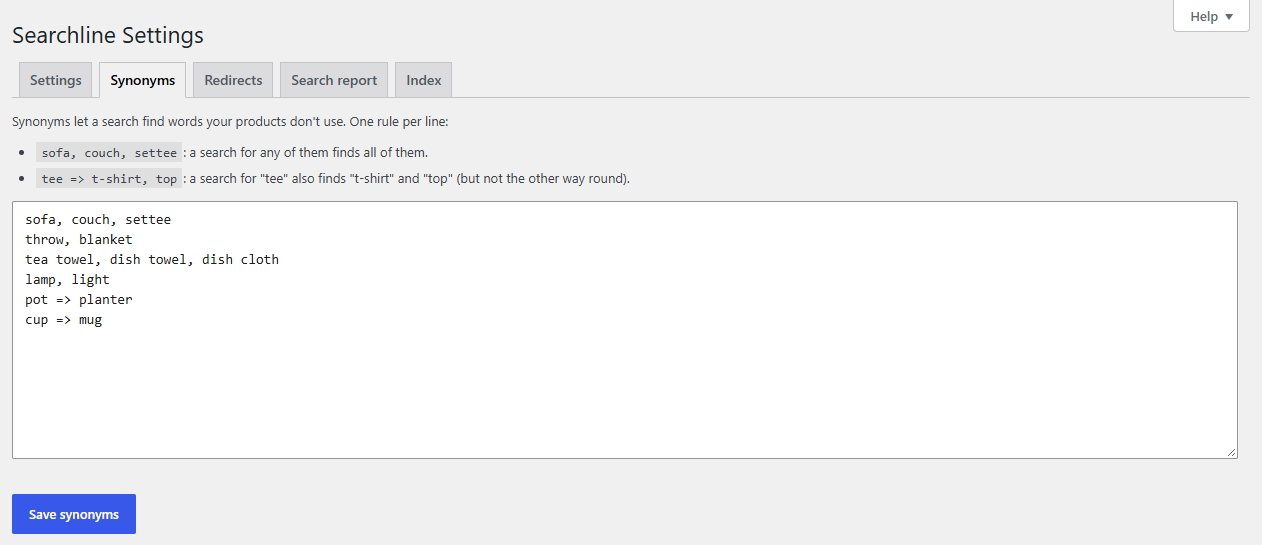
Add synonyms
- Go to WooCommerce → Searchline → Synonyms.
- Type one rule per line in the box.
- Click Save synonyms. They work straight away, no rebuild needed.
Two kinds of rule
| Rule | What it does |
|---|---|
sofa, couch, settee |
Two-way: words separated by commas are equal. A search for any of them finds all of them. |
tee => t-shirt, top |
One-way: a search for "tee" also finds "t-shirt" and "top", but a search for "top" doesn't find "tee". |
Use one-way rules when the words aren't really equal: a search for "pot" can show planters, while a search for "planter" should stay with planters.
Either side can be several words: phone case => cover. Capitals and accents don't matter. Lines that don't have at least two sides are dropped when you save.
Tip
You don't have to type rules from scratch. The search report lists the searches that found nothing. Hover over one and click Add synonym, or add Searchline's close match in one click. It adds a one-way rule here for you.
Tip
Forgot how a rule is written? The Help tab at the top right of the screen has the rules in short.
How synonyms rank
A product found through a synonym counts almost as much as one found through the word itself. On English sites the synonym's other forms are found too: with sofa, couch, a search for "couch" also finds products called "Sofas".
Which searches a rule covers
You only need to type each word once. A rule also covers:
- Other forms of its words, on English sites: with
sofa, couch, a search for "couches" finds the sofas too. - Typos, the same as anywhere in search (see How results are found): "cuoch" is covered. Short words (3 letters or fewer) and words with digits must be typed as written, and a word your catalog has itself is never taken for a typo: with
sofa, couch, a search for "coach" stays with coach products.
For several-word sides (phone case => cover), the search must have those words next to each other, in the same order.
Related
- Redirects: send a search straight to a page instead.
- How results are found