
Paying with gift cards and store credit
How customers spend gift cards and store credit at checkout: cards first, then credit, after tax, over as many orders as the balance lasts.
Gift cards and store credit pay for an order the way a payment does: they lower what's left to pay after tax and shipping, and the customer pays the rest with any payment method. They aren't coupons, so coupons still work alongside them.
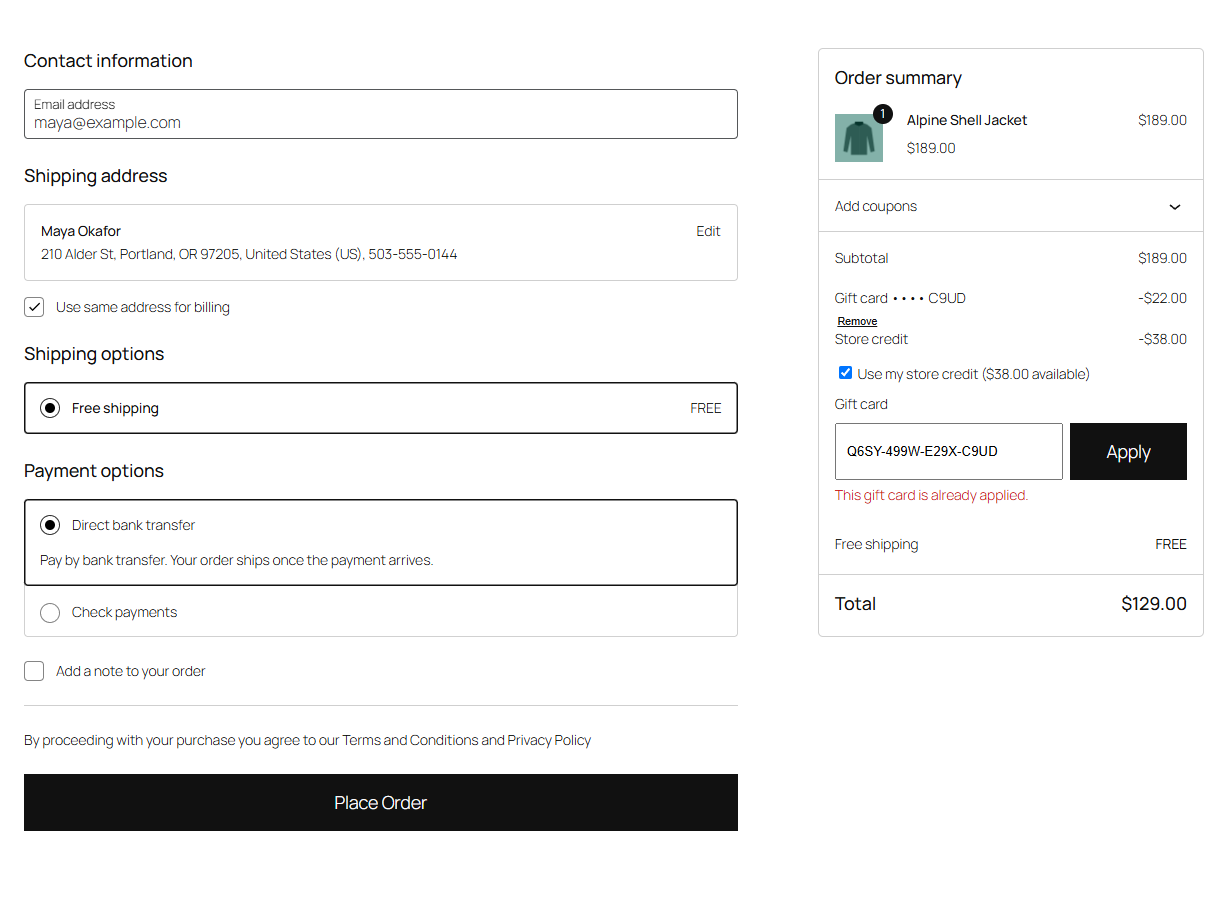
At checkout
Checkout block: under the order summary, a Gift card field with Apply. Logged-in customers with store credit also see Use my store credit ($38.00 available).
Classic checkout and cart: a Have a gift card? field with Apply gift card above the form, and for customers with store credit, "You have $38.00 of store credit." with a Use store credit or Don't use store credit button.
Codes can be typed in any case, with or without the dashes. Each card used gets its own row above the order total, such as "Gift card •••• 7KAH −$22.00", with a link to remove it. Store credit gets a "Store credit" row.
What pays first
- Gift cards, in the order they were applied. Up to five cards on one order.
- Store credit, for what's left, when the customer uses it.
Each balance pays as much as it can, up to what's left. A $100 card on a $60 order pays $60 and keeps $40 for next time. If the balances cover the whole order, there's nothing left to pay and the order goes straight through.
Store credit is used automatically for logged-in customers, unless you turn Store credit at checkout off in the settings. Customers can always switch it off or on for an order. Store credit needs an account; gift cards work for guests too.
Gift card products in the same cart can't be paid with a gift card or store credit: a card can't buy another card. The rest of the cart can.
When the balance is taken
The balance is taken when the order is placed, before the payment, so two orders can never spend the same balance twice. If someone else spent it in the meantime, the checkout says so and asks the customer to remove the card.
If the order is then cancelled, fails or is refunded in full, the balance goes back to the card or the credit. If a failed order is paid after all, the balance is taken again; if it's no longer there, the customer is told the full amount is now due before paying.
On the order
The order shows each balance used as its own row above the total: on the thank-you page, in My Account, in the order emails and on the order screen. The order notes list what was paid with each balance. On the card's screen under WooCommerce → Gift cards, the order is in its history.
When an order leaves a card or the credit at or below the Low balance email amount (if you set one), the customer gets an email saying what's left.
Refunds of orders paid with a balance
The refund amount WooCommerce offers on the order screen is what the customer paid with their payment method. When the whole order is refunded (its status becomes Refunded), the gift cards and credit it used get their balance back as well. For a partial refund, give back what you want to the card or credit with Change balance on its screen. Refunding to store credit (see Store credit and refunds) only covers what the customer paid with their payment method, so an order paid entirely with gift cards or credit has nothing to refund that way: use Change balance.
Checking a balance
Customers can check a card's balance in My Account → Gift cards & credit, or on any page where you add the [giftline_balance] shortcode, such as a "Gift cards" page. See Gift cards and credit in My Account.
Note
Wrong codes count towards a limit per visitor, at checkout and on the balance check alike, so codes can't be guessed. See Wrong codes and security.