
What breaks
Before you remove a plugin or theme, see the content and data that depend on it.
The What breaks tab of Tools → Pruneline answers one question per plugin: what stops working, or stays behind, if it goes? It lists every installed plugin and theme, and deleted ones Pruneline read while they were installed.
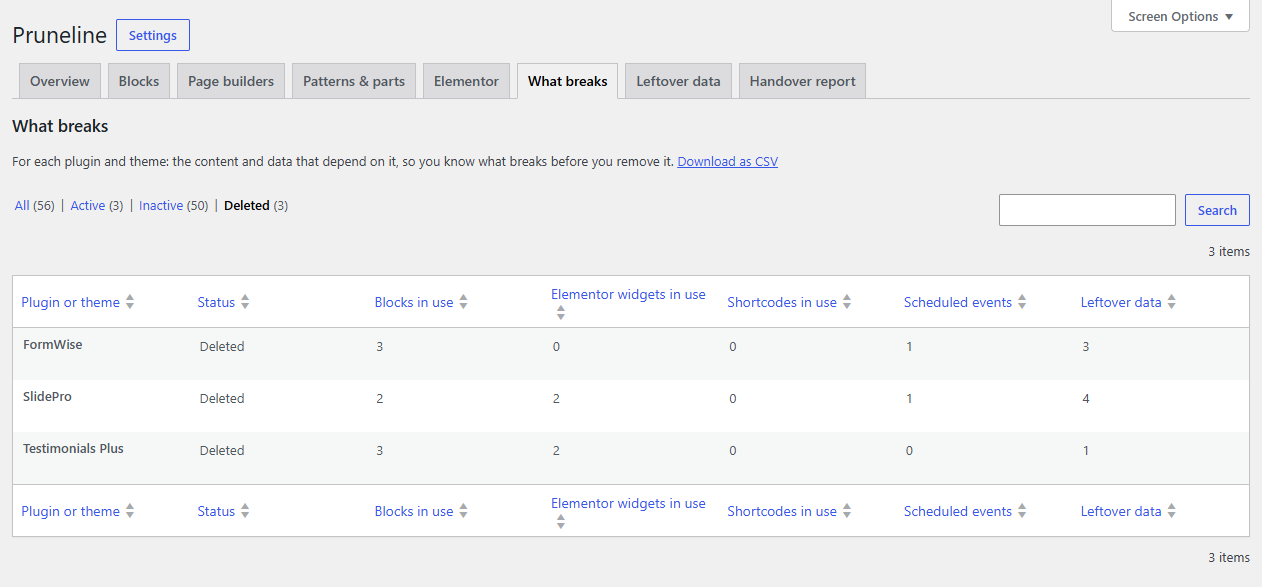
Check a plugin before you remove it
- Go to Tools → Pruneline and run a scan, so the counts are current.
- Open What breaks and find the plugin. Click Active at the top to show only active ones.
- Hover over it and click Details to see each block, widget, shortcode, scheduled event or leftover item, by name, with how many places use it.
- Fix those places first, or keep the plugin.
The columns
| Column | What it counts |
|---|---|
| Plugin or theme | Its name. Themes have (theme) after the name. |
| Status | Active, Inactive or Deleted. |
| Blocks in use | Places that use its blocks. |
| Elementor widgets in use | Places that use its Elementor widgets. |
| Shortcodes in use | Places that use its shortcodes. Only counted while Bracketline is active (see below). |
| Scheduled events | Its scheduled events that are waiting to run. |
| Leftover data | Options, tables and meta it left behind. Only for inactive and deleted plugins. |
Use the views Active, Inactive and Deleted to narrow the list. Inactive themes with nothing depending on them are left out.
After a plugin is gone
Switch to Inactive or Deleted to see what a removed plugin still affects: the blocks and widgets now missing from your pages, and its leftover data. From there:
- Missing blocks: see Blocks.
- Missing widgets: see Page builders and templates.
- Leftover data and scheduled events: see Leftover data and cleanup.
Shortcodes
Pruneline doesn't audit shortcodes in general. With Bracketline, our free shortcode audit, active, Shortcodes in use counts the places that use each plugin's shortcodes, including shortcodes of plugins that are gone, from Bracketline's last scan.
Note
Pruneline can only name a deleted plugin if it read the plugin's code while it was still installed. A plugin deleted before you installed Pruneline isn't listed, and what it left behind shows with an unknown owner.