
Elementor
See which Elementor widgets each page uses, and find elements hidden on every device that still load.
The Elementor tab of Tools → Pruneline has two lists for sites built with Elementor: Widget usage and Hidden everywhere. Switch between them with the links under the tabs. Missing Elementor widgets are on the Page builders tab.
Pruneline reads Elementor's own page data, not the plain-text copy Elementor keeps in the page content.
Widget usage
Widget usage lists every page, post and template built with Elementor, drafts included, with:
| Column | What it shows |
|---|---|
| Page | Its title. Click it to open it in Elementor. |
| Type, Status | The kind of content, and whether it's published. |
| Different widgets | How many kinds of widget it uses. |
| Widgets | How many widgets it holds in total. |
| Missing | How many of its widget kinds don't work now. |
Hover over a page and click Details to see each widget on it, the add-on it comes from (From), its status and how many times it's used. That tells you which pages need an add-on before you remove it.
Elements hidden on every device
In Elementor, any element can be hidden on desktop, tablet or mobile. An element hidden on every device is never seen, but it stays in the page and still loads.
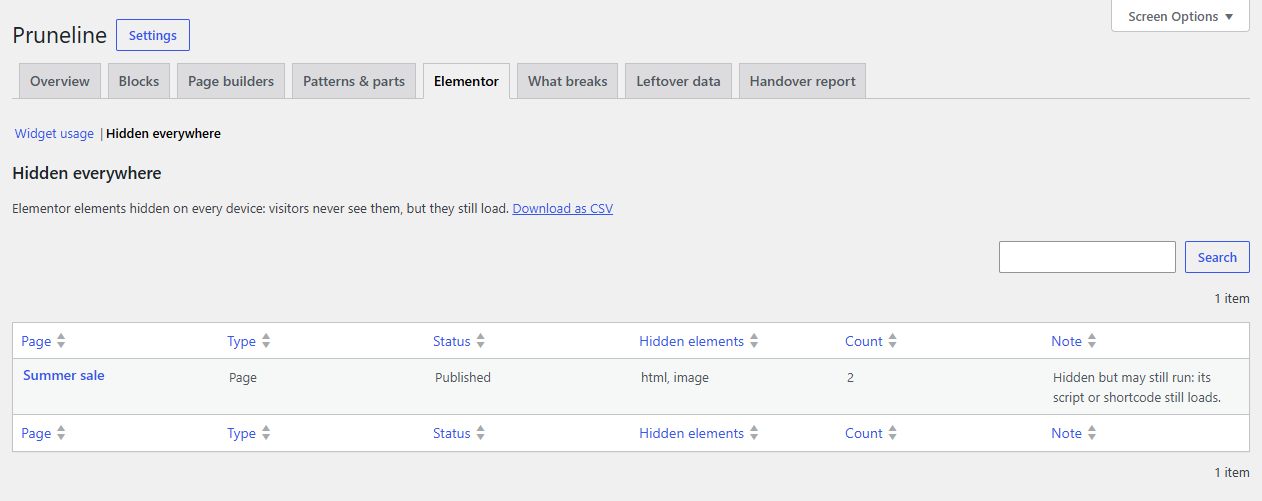
- Open Elementor, then Hidden everywhere.
- Each row is a page, with the hidden elements (such as
heading,html × 2), how many there are, and a note. - Click the page to open it in Elementor, then delete the elements or show them again.
Hidden but may still run: its script or shortcode still loads. marks pages whose hidden elements include an HTML, Shortcode, Code Highlight or Custom HTML widget. Hiding only hides them from view, so a tracking script or a form inside still runs.
Pruneline follows the devices your site uses. If you added breakpoints in Elementor, an element must be hidden on all of them. Elementor's newer (V4) elements hide in another way and aren't listed.
In the Elementor editor
Pruneline also adds a small shortcode panel to the Elementor editor. See Elementor editor panel.