
Deposits at checkout
What customers see in the cart and at checkout, the choice to pay in full, and how tax and shipping are split between the deposit and the balance.
Depositline works in the Checkout block and the classic checkout. The products keep their full price on the order; what's left to pay later comes off as one line, so the total is what the customer pays today.
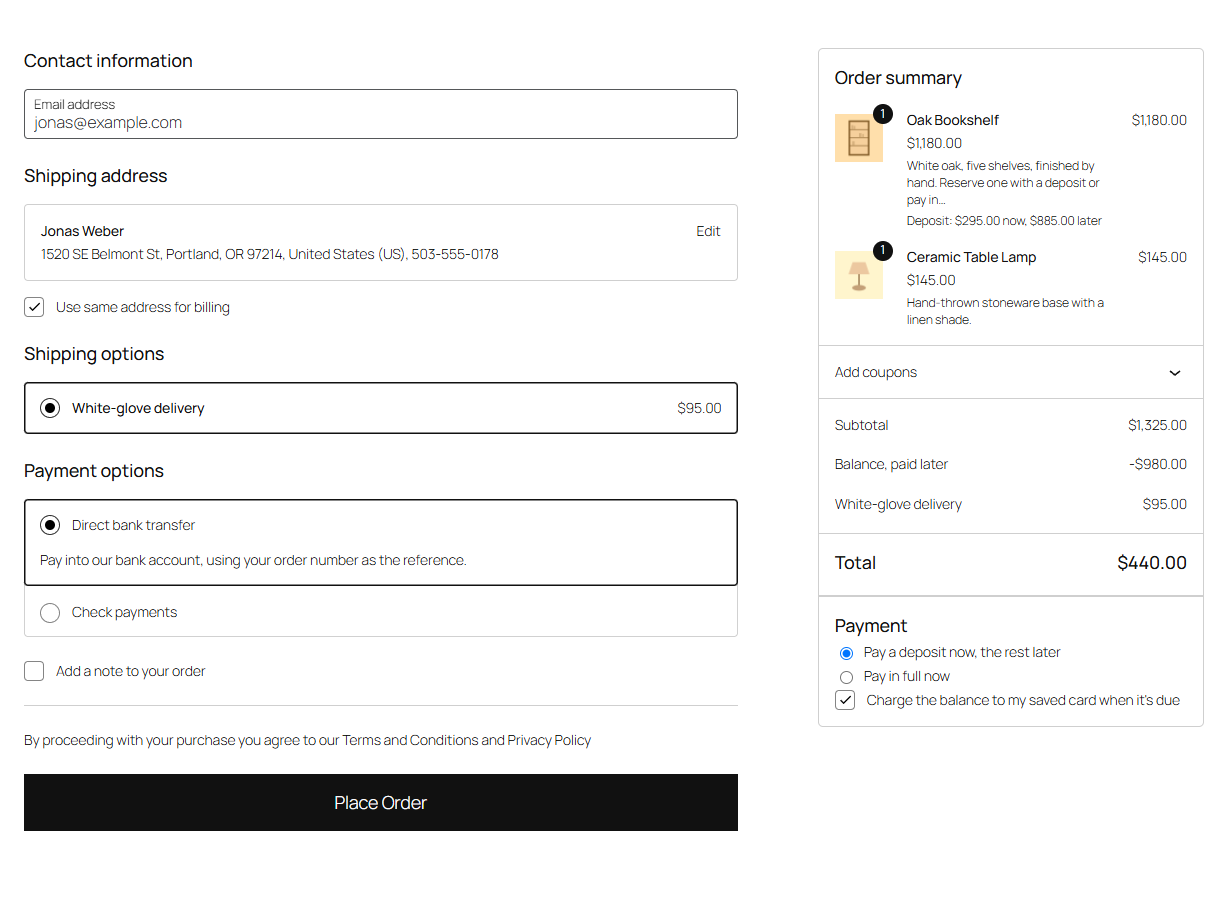
In the cart and at checkout
- Each item that takes a deposit shows Deposit: $20.00 now, $80.00 later under its name.
- A Balance, paid later line takes the balance off the total.
- Items without a deposit are paid in full, in the same order.
- Coupons come off the price first; the deposit is worked out on what's left.
Paying in full instead
When the cart has an item set to Deposit, or pay in full at checkout, the checkout shows Payment with two choices:
- Pay a deposit now, the rest later (the default)
- Pay in full now
In the Checkout block it's in the order summary; in the classic checkout it's a row above the total. The totals update straight away. Paying in full only applies to optional deposits: items set to Deposit required still take their deposit.
Tax and shipping
Under WooCommerce → Depositline, Tax and shipping decides when they're paid:
- Paid with the balance (the default): the customer pays only the deposit today. The tax on the items with a deposit, the shipping and the shipping tax are added to the balance.
- Paid with the deposit: the customer pays the deposit, the tax and the shipping today. The balance is only the rest of the price.
Other fees on the order, such as a payment surcharge, are always paid today.
Note
With Paid with the balance, WooCommerce never lets the "Balance, paid later" line take more than the products, other fees and shipping before tax off the total. So when the deposit is smaller than the tax that goes with the balance, part of the tax is paid today. The checkout then says so under the line, for example: "Part of the tax ($12.00) is paid today: the balance can't be more than the products, shipping and other fees before tax." This only happens with very small deposits; a deposit at least as large as the tax avoids it.
Having the balance charged to a saved card
Logged-in customers paying a deposit can tick Charge the balance to my saved card when it's due: in the Checkout block's order summary, or above Place order in the classic checkout. It appears when Saved cards is on under WooCommerce → Depositline and the WooCommerce Stripe Gateway is active. See Collecting the balance.
Express payment buttons
Express buttons such as Apple Pay, Google Pay and Link charge the whole cart outside the checkout, so they're hidden while a deposit is paid: on the product page of a product that takes a deposit, and in the cart and checkout. When the customer chooses Pay in full now and nothing else in the cart takes a deposit, they come back at checkout.
After the order is placed
The order total is the deposit (plus anything paid today). On the order received page, in My Account and in the order emails, the totals show a Balance: row, such as "$80.00, due November 3, 2026". What happens next is in Deposit and balance orders.