
Collecting the balance
How customers pay the balance, by payment link or from My Account, and how it's charged to a saved card on the due date.
Customers pay the balance in one of three ways:
- The payment link in the emails Depositline sends before, on and after the due date.
- Pay balance in My Account.
- Automatically, charged on the due date to a card they saved, if they agreed at checkout.
The link and My Account work with every payment method your store offers. The balance can be paid any time before the due date too.
The payment link
The balance order has a payment link, like any unpaid WooCommerce order. Depositline emails it with WooCommerce's "order details" email, which then has the subject "Balance due for your order #123 on (your store)" and the heading "Balance for order #123", with a line saying what it's for, such as "This is the balance of $80.00 for your order #123, due on November 3, 2026."
When the emails go out is set under Reminders: see Reminders and overdue balances. You can also send it any time from the order screen: see Deposits on the order screen.
My Account
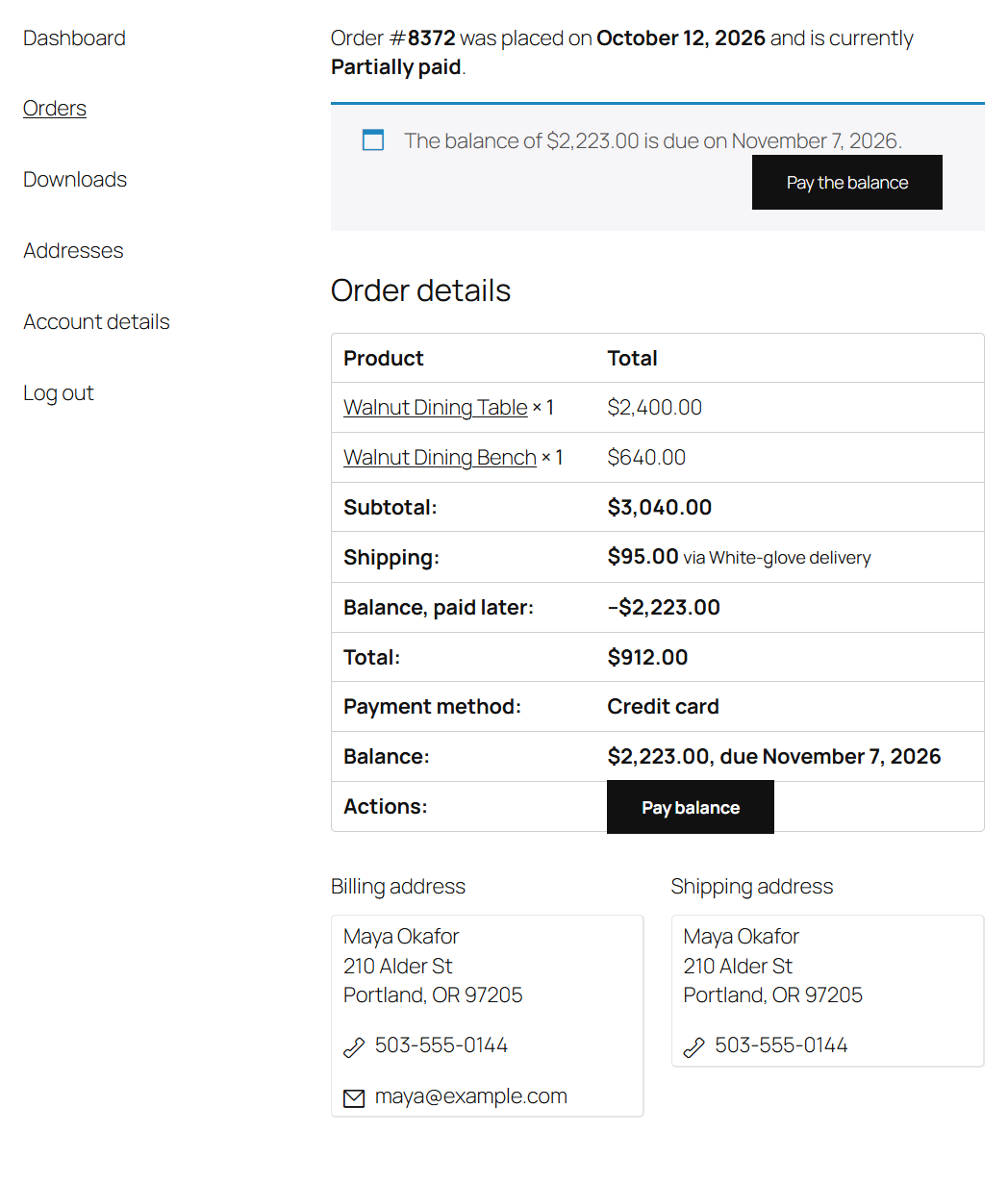
- Under My Account → Orders, a deposit order whose balance is due has a Pay balance button.
- The order's own page says "The balance of $80.00 is due on November 3, 2026." with a Pay the balance button.
Both open WooCommerce's payment page for the balance order. Once it's paid, the order moves on to Processing, or Completed when nothing ships.
Charging a saved card on the due date
With the WooCommerce Stripe Gateway, customers can have the balance charged to their card on the due date, so they don't have to come back to pay.
Set it up
- Install and set up the WooCommerce Stripe Gateway, and enable it as a payment method.
- Go to WooCommerce → Depositline.
- Under Balance, tick Saved cards: Offer to charge the balance to the customer's saved card on its due date (on by default).
- Click Save Changes.
Without the Stripe plugin, the setting says "Needs the WooCommerce Stripe Gateway plugin. Without it, customers pay the balance with the emailed payment link."
What the customer does
At checkout, a logged-in customer paying a deposit ticks Charge the balance to my saved card when it's due. When they pay the deposit by card with Stripe, that card is saved to their account.
What happens on the due date
At 9:00 on the due date, the balance is charged to:
- the card the deposit was paid with, if it's saved;
- otherwise their default saved Stripe card.
If the charge goes through, the balance order is paid (with the note "Balance charged to the saved card: Visa ending in 4242 (expires 12/28)."), no "due today" email is sent, and the order moves on to Processing. Refunds go through Stripe as for any Stripe payment.
If it doesn't (the card is declined or has expired, the bank wants the customer to confirm the payment, or there's no saved card left), the customer gets the payment link instead, with the reason: "We tried to charge your saved card, but it didn't go through: Your card was declined. Please pay the balance of $80.00 for your order #123 with the link below." The reminders after the due date carry on as usual.
Note
The charge is tried once, on the due date. After a failure the customer pays through the link; you can try the card again from the order screen with Charge the balance to the saved card.
If you switch Saved cards off, no card is charged, not even for customers who already agreed: on the due date they get the usual "due today" email with the payment link. Their Deposit box says "The customer agreed to have the balance charged to a saved card, but saved cards are switched off: they'll get a payment link."
On the order screen, the Deposit box says whether the customer agreed, and which card will be charged ("The customer agreed to have the balance charged to their saved card, Visa ending in 4242 (expires 12/28), when it's due."). After a failed charge, it shows "Last charge to the saved card failed:" and the reason.
Tip
Other payment gateways can be connected for automatic charges by a developer: see Hooks.