
VAT numbers and reverse charge
The VAT number field at checkout, the VIES check, when VAT comes off for business customers, what happens when VIES is down, and the VAT box on the order screen.
A business customer in another EU country who gives a valid VAT number pays no VAT: they account for it themselves (reverse charge). Folioline asks for the number, checks it with VIES, the European Commission's VAT number service, and takes VAT off the totals before the customer pays.
The VAT number field
With VAT number field on (WooCommerce → Folioline → VAT), customers see it with the billing address:
- in the Checkout block, as VAT number (optional, for businesses);
- in the classic checkout, as VAT number, after the company name;
- in My Account → Addresses → Billing address, so the next order starts with it.
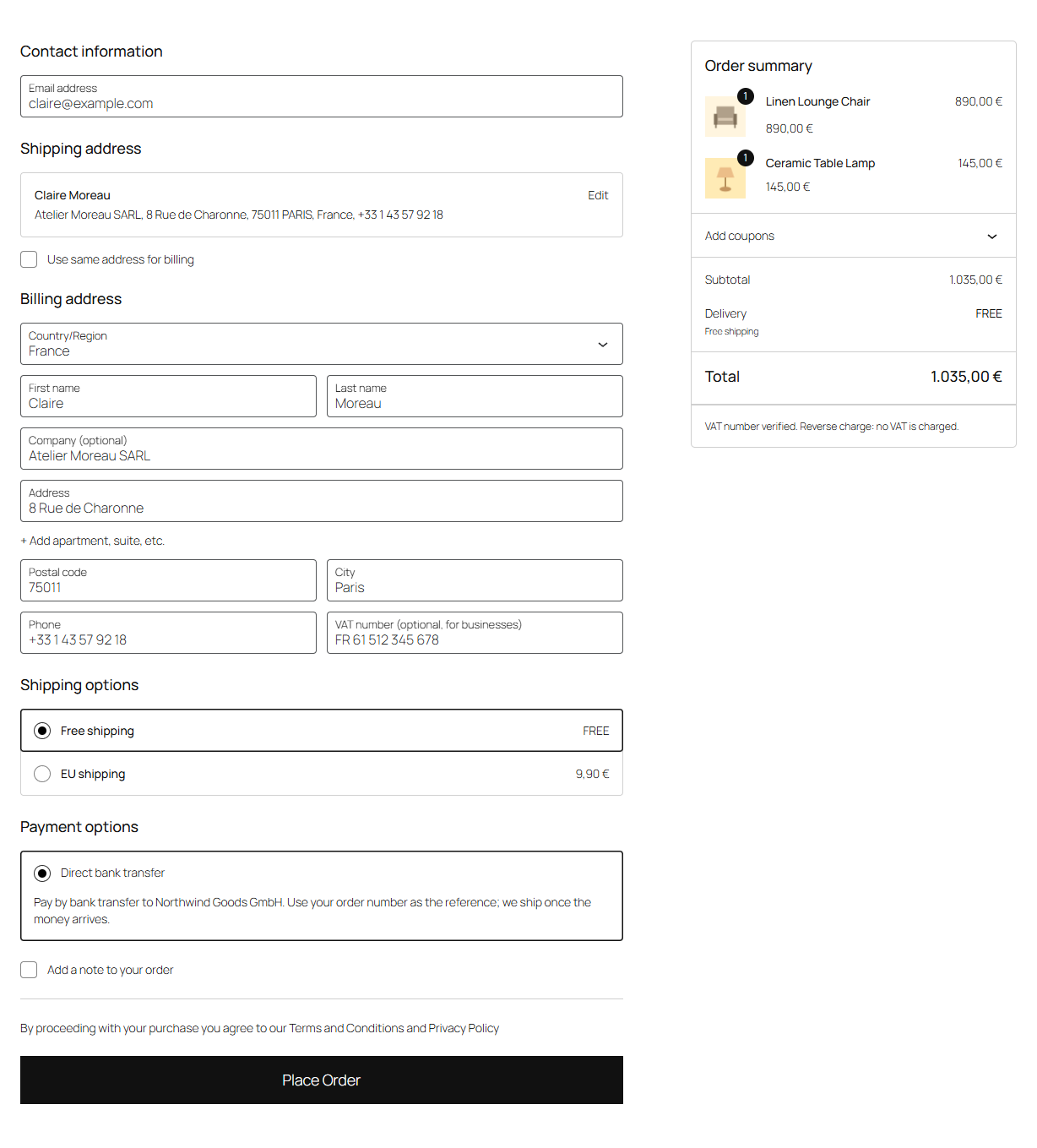
Customers type the number with its country code, such as FR40303265045. Spaces, dots and dashes don't matter, and a Greek number may start with GR or EL. A number without a country code, or in the wrong format for its country, is refused with a message, so typos are caught before the order is placed.
Tick Required to make the number required for customers billed in the EU who enter a company name.
When VAT comes off
VAT comes off when all of these are true:
- Your store address (WooCommerce → Settings → General) is in the EU.
- The billing country is another EU country.
- The VAT number belongs to the billing country and has its format.
- Goods in the order aren't delivered in your own country: not shipped to it, and not picked up at your store. An order of services alone goes by the billing country. When an order's goods are delivered in your country, the whole order is charged VAT, services included: sell the services in an order of their own to have them reverse charged.
- VIES says the number is valid.
The totals change as soon as the customer leaves the field. Under the totals, a line says what happened:
| The checkout says | What it means |
|---|---|
| VAT number verified. Reverse charge: no VAT is charged. | VIES confirmed it; VAT is off. |
| This VAT number isn't valid in the EU VAT number check (VIES), so VAT is charged. | VIES doesn't know the number. |
| This VAT number is from another country than the billing address, so VAT is charged. | A German number with a French billing address, for example. |
| VAT is charged: your business is in the same country as the shop. | Domestic sales are never reverse charged. |
| VAT is charged: the goods are delivered in the shop's country. | A French business with goods shipped to, or picked up in, your country: Folioline charges VAT, as for a domestic sale. If a business customer collects the goods and takes them to its own country, and you hold proof of the transport, you can take VAT off on the order by hand. |
| This VAT number doesn't have the right format for its country, so VAT is charged. | A typo, most likely. |
| The VAT number couldn't be checked right now… | VIES is down: see below. |
When the order is placed, Folioline asks VIES again. If the answer changed the totals, the customer sees the new total before paying.
The number is printed under the billing address on the order screen, in emails, on the order-received page and in My Account, and on the invoice.
Customers outside the EU can give a tax number too. It's kept and printed on the invoice, but it doesn't change the tax: what WooCommerce charges for their country applies.
Note
Folioline only takes VAT off for valid EU numbers. It uses WooCommerce's own VAT exemption, so a customer another plugin marks as tax exempt stays exempt.
When VIES is down
VIES depends on each country's own register, and one is sometimes unavailable for minutes or hours. Choose what happens under When VIES is down:
- Accept the number and take VAT off, then check it again later (the default). The customer reads "The VAT number couldn't be checked right now. VAT is removed (reverse charge), and the number will be checked again after your order."
- Charge VAT, then check the number again later. The customer pays VAT and reads that the number will be checked after the order.
Either way, the order gets a note, and Folioline checks the number again on its own: after 15 minutes, then 1, 3, 12 and 24 hours, until VIES answers. The answer is added as an order note, such as "VIES confirmed the VAT number … (consultation number …)."
A later check never changes the order's totals. If VIES says the number isn't valid on an order placed without VAT, the note says so and asks you to check the number with the customer, as the invoice may need a correction (see Credit notes). If five checks fail, the note asks you to check it again from the VAT box.
Tip
A number VIES confirmed within the last day still counts while VIES is down, so returning customers aren't affected by a short outage.
The VIES consultation number
When your own VAT ID is filled in on the Seller tab, VIES answers every check with a consultation number: proof that you checked the number, and when. Folioline keeps it on the order and prints it on the invoice under the customer's VAT number.
The VAT box on the order screen
The VAT box on the order screen also has the Buyer reference for e-invoices (see E-invoices). It shows:
- the customer's VAT number and a status: Valid, Invalid, Not checked yet (VIES was down) or Not checked (the number couldn't take VAT off, or VIES checks are off);
- "Reverse charge: no VAT charged." or "VAT charged.";
- the consultation number, when it was checked, and the name and address VIES has for the number.
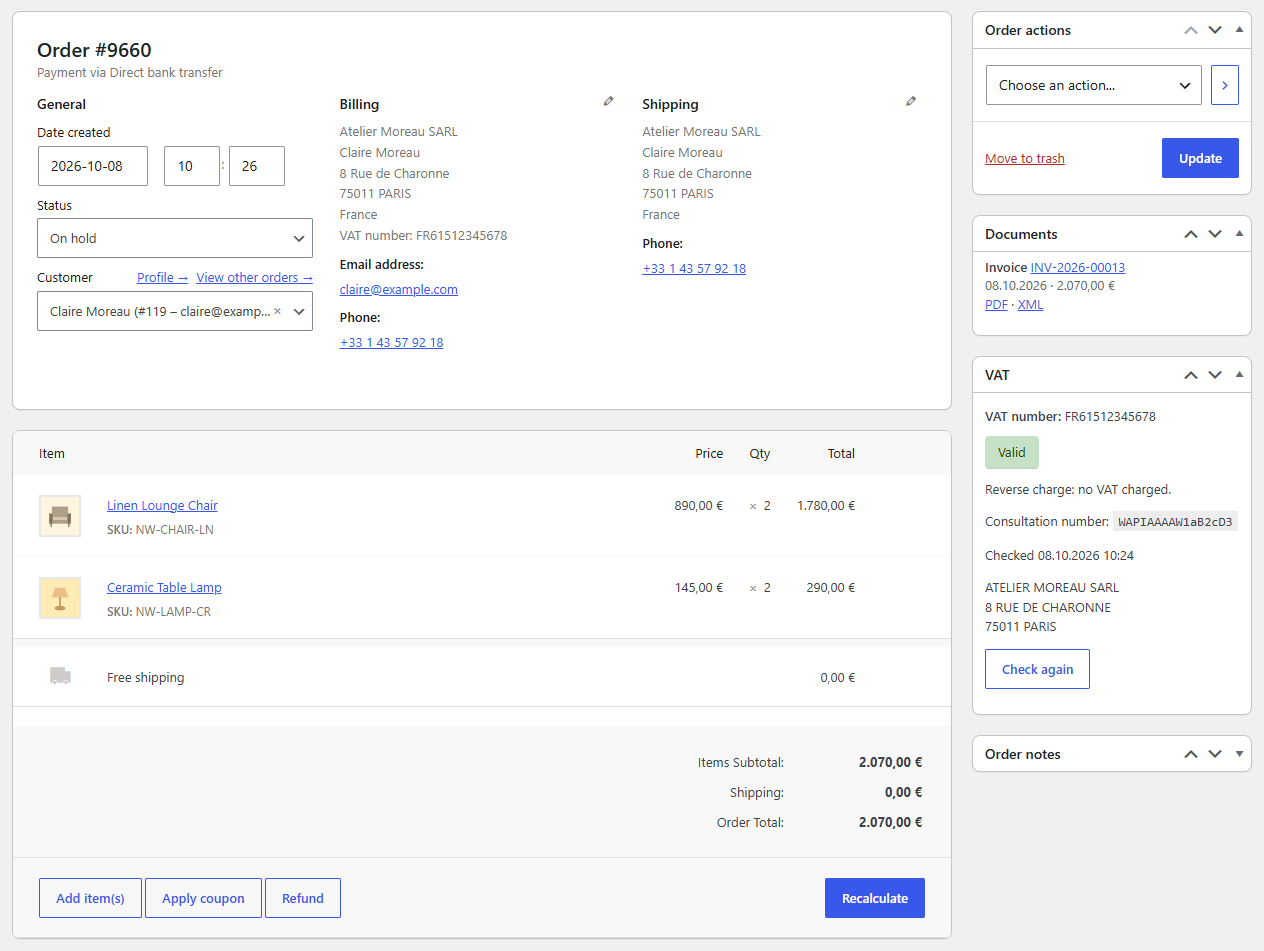
Click Check again to ask VIES now. The answer is recorded with a note; the order's totals stay as they are.
Orders you create yourself
On orders created under WooCommerce → Orders → Add order, the VAT box has a Customer VAT number field.
- Fill in the billing address, including the country.
- Type the number in Customer VAT number and save the order. Folioline checks it with VIES.
- If the note says reverse charge applies, click Recalculate in the order items: the totals are worked out without VAT.
Location evidence
For sales of digital services to consumers in other EU countries, the rules ask for two pieces of evidence of where the customer is. With Location evidence on, Folioline keeps the customer's IP address, the country it belongs to and the billing country with every order placed at checkout.
The IP country comes from WooCommerce's geolocation: set up its MaxMind database under WooCommerce → Settings → Integration, or use a host or CDN that passes the visitor's country. Without either, the IP address is kept but its country is empty. Folioline never sends IP addresses to an outside service.
Fieldline
If Fieldline already adds a checkout field that looks like a VAT number, Folioline says so on its settings page and the Plugins screen, so customers aren't asked twice. See Working with other plugins.