
Emails and My Account
Which WooCommerce emails carry the invoice and credit note, and how customers download them in My Account.
Folioline sends no emails of its own. It attaches invoices and credit notes to WooCommerce's customer emails, so customers get them in the emails they already receive.
Invoices in emails
Under WooCommerce → Folioline → Documents → Attach invoices to, tick the emails the invoice PDF goes with. To start with:
- Processing order, sent when an order is paid;
- Completed order;
- Order details, the email you send by hand from the order screen (Order actions → Send order details to customer).
Every customer email WooCommerce and your other plugins send is listed. The invoice is attached once the order has one. When the email is sent for an order at one of your Issue invoices at statuses and its invoice isn't issued yet, Folioline issues it first, so it's never missing.
The file is named after the invoice number, such as INV-2026-00001.pdf.
Credit notes in emails
Under Attach credit notes to, Refunded order is ticked to start with. The credit note of the refund goes with the email WooCommerce sends for a full or partial refund.
An e-invoice file as well
Choose a format under E-invoice file to attach its file next to each PDF, such as INV-2026-00001-xrechnung-ubl.xml. See E-invoices.
Note
If a file can't be made, for example because PDFs need a PHP extension your server lacks, the email still goes out without it. The reason is logged under WooCommerce → Status → Logs (source folioline).
My Account
With My Account ticked (Customers can download their invoices and credit notes under My Account → Orders), logged-in customers get:
- an Invoice button next to each invoiced order under My Account → Orders;
- a Documents table on the order's page, with each invoice and credit note, its date and total, a PDF button, and the e-invoice file when you chose one.
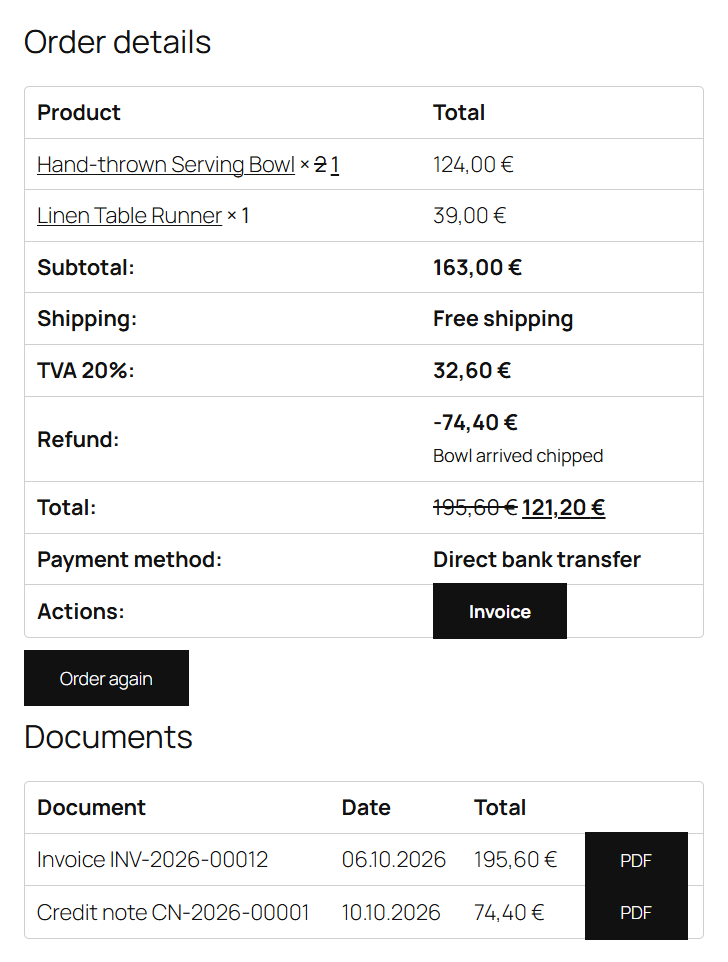
Customers only see their own orders' documents, and the downloads only work while they're logged in.
Guest customers have no account, so they get their documents as email attachments only. Make sure Attach invoices to has an email they receive.
Changing the My Account table
The Documents table is a template. To change it, copy templates/myaccount/documents.php from the Folioline folder to your-theme/folioline/myaccount/documents.php and edit the copy.